GigaVUE-Fabric-Manager
GigaVUE-Fabric-Manager
Clone Dashboard
GigaVUE‑FM does not allow you to edit the default dashboards. However, you can clone the system dashboard and make changes to the new dashboard.
To clone a dashboard:
- On the left navigation pane, click on
 . Select Analytics > Dashboards.
- Navigate to the dashboard page for which you need to create a clone.
- Click the Clone button on the submenu bar.
- Enter a name for the new dashboard and click Confirm Clone. The new dashboard is created.
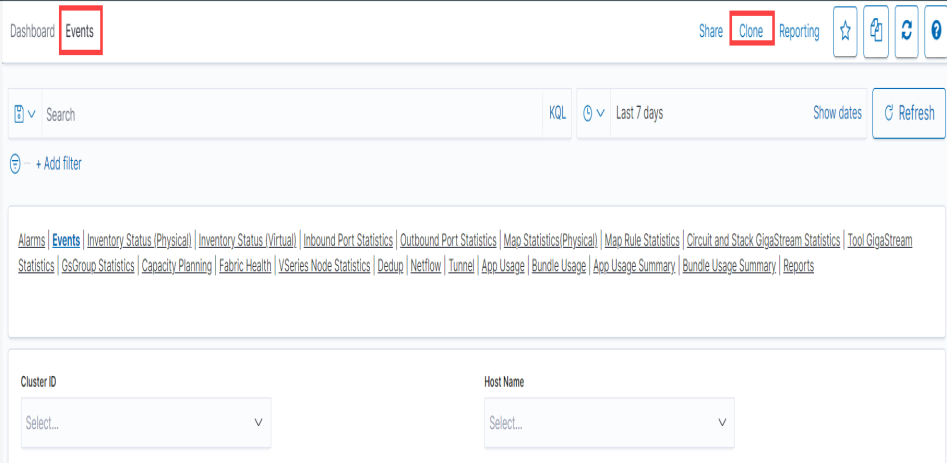
Refer to the Edit Dashboard section for details on editing the dashboard.
No
Yes
gv-fm-614
GV-FM-614
Yes
GigaVUE-FM-Install-Upgrade-Guide-v614.pdf
(Undefined variable: bookPDFVar.CL-AnalyticsPDF)
GigaVUE-Cloud-Suite-Deployment-Guide-AWS-Secret-Region-v614.pdf
GigaVUE-Cloud-Suite-Deployment-Guide-Azure-Secret-Region-v614.pdf
GigaVUE-Cloud-Suite-Terraform-v614.pdf
GigaVUE-FM-Administration-Guide-v614.pdf
GigaVUE-FM-InstallUpgradeGuide-v614.pdf
GigaVUE-Fabric-Management-User-Interface-Guide-v614.pdf
GigaVUE-FM-Copilot-User-Guide-v614.pdf
GigaVUE-Application-Intelligence-Solution-Guide-v614.pdf
GigaVUE-FM-Ansible-User-Guide-v614.pdf
Factory-Reset-Guidelines-for-GigaVUE-FM-and-GigaVUE-OS-Devices.pdf
GigaVUE-Inline-Solutions-Guide-v614.pdf
GigaVUE-Nodes-And-Cluster-Guide-v614.pdf
GigaSMART-Operations-Reference-Guide-v614.pdf
GigaVUE-OS-Administration-Guide-v614.pdf
GigaVUE-OS-Hardening-Guide-v69.pdf
GigaVUE-OS-Upgrade-Guide-v614.pdf
GigaVUE-Subscriber-Intelligence-Guide-v614.pdf
GigaVUE-Traffic-Filtering-Guide-v614.pdf
GigaVUE-Traffic-Intelligence-Guide-v614.pdf


