GigaVUE‑FM
GigaVUE‑FM fabric manager (GigaVUE-FM) is a web-based fabric management interface that provides high-level visibility and management of both the physical and virtual traffic visibility nodes that form the Gigamon Traffic Visibility Fabric™. GigaVUE-FM can manage the following types of traffic visibility nodes:
| Physical GigaVUE Nodes – GigaVUE‑FM manages GigaVUE TA Series, and HC Series nodes, allowing for a unified workspace, while also providing an easy-to-use wizard-based approach for configuring Flow Mapping®® and GigaSMART® traffic policies. For a list of GigaVUE TA Series, and HC Series nodes supported for management in this release, refer to Supported Nodes . |
| Virtual GigaVUE Nodes – GigaVUE‑FM also extends the GigaVUE feature set into the virtual space by allowing for the discovery, configuration, and management of the new GigaVUE-VM virtual traffic visibility node. GigaVUE-VM provides powerful Flow Mapping® technology for the traffic flowing between virtual machines, allowing you to distribute cloud-based traffic to physical tool ports in the visibility fabric. |
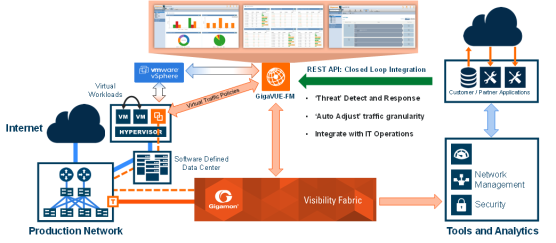
| 1 | GigaVUE‑FM Overview |
Learn about:
| how to install and upgrade GigaVUE-FM fabric manager (GigaVUE-FM Installation and Upgrade). |
| how to install and upgrade GigaVUE‑FM fabric manager using CLI commands (GigaVUE-FM CLI Commands. |
| how to get started with GigaVUE‑FM (Get Started with GigaVUE‑FM |
| how to add users, create groups and create roles and other administrative task on GigaVUE‑FM (Administer GigaVUE‑FM) |
| how to add and manage nodes ( Device and Configuration Management, Supported Browsers for GigaVUE-FM). |
| how to manage dashboards (Get Started with Analytics UI, Analytics |
| how to deploy GigaVUE‑FM Copilot (GigaVUE-FM Copilot |
Supported Cloud Environments
The GigaVUE Cloud Suite solution for the various cloud platforms offers network traffic visibility in the respective cloud platforms. The GigaVUE Cloud Suite solutions acquire, optimize and distribute selected traffic to security and monitoring tools. The below table lists the available cloud suites and their respective guides.
|
Cloud Platform |
Guides |
|
Public Cloud |
|
|
AWS |
GigaVUE Cloud Suite Deployment Guide - AWS GigaVUE Cloud Suite for AWS–GigaVUE V Series 1 Guide |
|
Azure |
GigaVUE Cloud Suite Deployment Guide - Azure GigaVUE Cloud Suite for Azure–GigaVUE V Series 1 Guide |
|
Private Cloud |
|
|
OpenStack |
GigaVUE Cloud Suite for OpenStack–GigaVUE V Series 1 Guide GigaVUE Cloud Suite Deployment Guide - OpenStack |
|
VMware |
GigaVUE Cloud Suite Deployment Guide - VMware GigaVUE Cloud Suite for VMware—GigaVUE-VM Guide |
|
Container Visibility |
|
|
Kubernetes |
GigaVUE Cloud Suite for Kubernetes Container Visibility Configuration Guide |
|
Gigamon Containerized Broker |
Gigamon Containerized Broker Deployment Guide |
|
Universal Container Tap |
Universal Cloud TAP - Container Deployment Guide |
|
Other Cloud Platforms |
|
|
Third party Orchestration |
GigaVUE Cloud Suite Deployment Guide - Third Party Orchestration |
|
Nutanix |
GigaVUE Cloud Suite for Nutanix Guide—GigaVUE-VM Guide |
The guides provide instructions on configuring the GigaVUE Cloud components and setting up traffic monitoring sessions for the respective Cloud platform.


