Gigamon Resiliency for Inline Protection
Gigamon Resiliency for Inline Protection (GRIP) is the umbrella term for node‑level resiliency in inline deployments.It ensures that live traffic continues to flow and inline tools remain protected, even if one node fails.
GRIP is implemented differently depending on whether you are using Classic Inline Bypass or Flexible Inline Arrangements, but the goal is the same: maintain service continuity and protect inline inspection during node outages.
Both models rely on bypass protection switch relays on BPS modules to provide physical fail‑safe behavior on protected inline networks
GRIP in Classic Inline Bypass
In Classic Inline Bypass, GRIP is a hardware‑based failover mechanism that uses stack signaling and relay‑protected inline links.
Two nodes are paired using a stack signaling link:
|
■
|
The primary node actively handles inline traffic. |
|
■
|
The standby node is ready to take over if the primary fails. |
|
■
|
Both nodes connect to the same inline network links through bypass combo modules (fiber) or copper TAP modules. |
These modules include optical or electrical relays that automatically close when the primary fails, rerouting traffic to the standby node. Failover typically occurs within 0–10 seconds.
If both nodes fail, GRIP ensures that traffic still flows directly between the inline network ports, bypassing the tools so the network remains available, even if inspection is lost.
GRIP in Flexible Inline (Redundancy)
In Flexible Inline Arrangements, node‑level resiliency is delivered through Redundancy, which functions as the Flex(Undefined variable: guideVar.Guide-VS-ISSL)ible Inline version of GRIP.
As in Classic, protected inline networks still use BPS relays for physical protection, but Flexible Inline adds policy‑driven redundancy and traffic steering on top of that hardware foundation
|
■
|
Both nodes can be configured in active/standby modes. |
|
■
|
If one node or tool path fails, traffic flows are automatically redistributed to the healthy node or tools, guided by session-aware hashing and policy rules. |
|
■
|
Failover is faster and more flexible. |
Across both deployment models, GRIP provides:
|
■
|
Node-Level Protection – Ensures traffic continuity even if an entire node fails. |
|
■
|
High Availability – Prevents tool disconnections and minimizes downtime. |
|
■
|
Operational Flexibility – Hardware relay-based protection in Classic; policy-driven redundancy in Flexible. |
|
■
|
Seamless Recovery – Once the failed node recovers, it can resume its role without disrupting live traffic. |
GRIP Scenarios
The following scenarios illustrate how GRIP behaves in real-world deployments, showing how traffic flows through primary and secondary nodes under different conditions.
Traffic Flows Through Node with Primary Role
When both nodes are active, the primary node handles all inline traffic. Its bypass protection switch relays remain open, directing traffic to the inline tool attached to the primary node. The secondary node monitors the state of the signaling link. As long as the link is up, the secondary node remains idle with its relays closed.
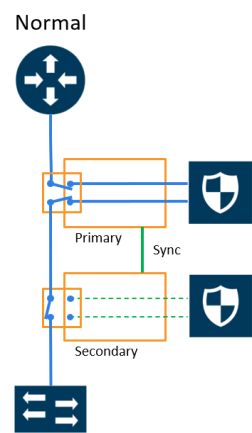
|
1
|
Traffic Flows Through Node with Primary Role |
Traffic Flows Through Node with Secondary Role after Primary is Lost
If the primary node loses power or becomes unavailable, its relays close automatically. The signaling link informs the secondary node, which then opens its relays. Traffic immediately shifts to flow through the secondary node, keeping the inline tool path active.
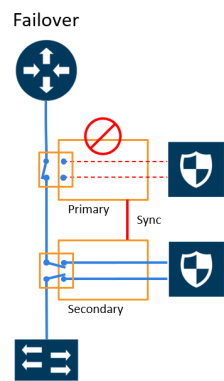
|
2
|
Traffic Flows Through Node with Secondary Role after Primary is Lost |
Both Nodes Go Down and Only Secondary Comes Up
If both nodes fail at the same time, and only the secondary is later powered back up, traffic is not passed through the inline tools. Instead, it is bypassed across the relays. For this reason, it is recommended to always restore the primary node as well, or promote the secondary into the primary role if the original primary is unreliable.
Both Nodes Fail; No Traffic Monitoring
If both nodes remain down, the bypass relays on both close, allowing network traffic to continue to flow, but all inline tools are bypassed. The network remains up, but without inspection or monitoring.
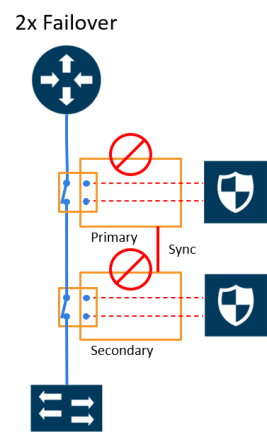
|
3
|
Both Nodes Fail; No Traffic Monitoring |
Both Nodes are in Suspended State
In the GRIP solution, if both primary and secondary nodes are switched to suspended , Network traffic will be bypassed instead of being sent to inline tools in both the nodes. Switching redundancy profile protection role on secondary node alone from suspended to secondary will still cause network traffic to be bypassed instead of being sent to inline tools in both the nodes .
It is recommended to switch the redundancy profile protection role on primary node from suspended to primary first , then followed by switching the redundancy profile protection role on secondary node from suspended to secondary.
How to Handle Recovery
When the primary node recovers, it restores its inline traffic paths and opens its relays. The signaling link then instructs the secondary node to close its relays, returning traffic to the primary path. Recovery is automatic, and traffic resumes flowing through the primary node’s tool path.
How to Cable GigaVUE Nodes
To cable two GigaVUE nodes, as shown in 1 with the primary on the left and the secondary on the right:
|
■
|
Connect the network shown at the top of 1 to inline network port A on the primary node. |
|
■
|
Connect inline network port B on the primary node to inline network port A on the secondary node. |
|
■
|
Connect inline network port B on the secondary node to the network shown at the bottom of the 1. |
|
■
|
Connect the signaling port on the primary node to the signaling port on the secondary node. |
Redundancy Profile
GRIP resiliency is managed by a redundancy profile, which defines how the two nodes coordinate:
|
■
|
Signaling Port – the port pair used to exchange health status between the nodes. |
|
■
|
Protection Role – assigns each node as Primary, Secondary, or Suspended. |
|
o
|
Primary: Actively handles inline traffic. |
|
o
|
Secondary: Remains on standby, takes over when the primary fails. |
|
o
|
Suspended: Used for maintenance or to manually force failover. |
Note: Cluster Limitation- GRIP is supported in clustered environments, but the Suspended role has restrictions on standby nodes. In this case, it is recommended to switch the standby into a new role or carefully apply the suspended state.
Refer to How to Use Suspended Role for Maintenance to know moreGigamon Resiliency for Inline Protection
Rules and Notes
Keep in mind the following rules and notes when you work with the Gigamon Resiliency for Inline Protection feature:
|
1.
|
The signaling port type should be a stack port, and only one port should be used. |
|
2.
|
All the inline components should be located in the same box within the cluster. |
|
3.
|
Adding the Inline Networks in the Inline Network Bundle and deploying the Solutions is recommended, which will be easy to export and import across the GRIP Nodes. |
|
4.
|
Post-reload or Power Cycle, the signaling port link stays down when the redundancy profile is attached to the inline network and no maps have been configured. A map should be configured to bring the signaling port up. If a map exists, the signaling port will appear without any issues. |
|
5.
|
Link Failure Propagation is not recommended for copper ports (TAP card ports). Fabric ports support LFP only in a single path (a-to-b only) is available. In all other cases, it is best to leave LFP enabled. |
|
6.
|
Gigamon Resiliency for Inline Protection (GRIP™) is not supported in GigaVUE-HCT devices. |
|
7.
|
GRIP is not supported in other GigaVUE TA Series devices due to the absence of BPS modules. |
Limitations
|
■
|
Link failure propagation is not recommended when inline network ports involve copper ports (TAP card ports) or fabric ports with only a single available path (a-to-b only). In all other cases, enabling LFP is recommended. |


