Introducing the GigaVUE‑HC1-Plus Chassis
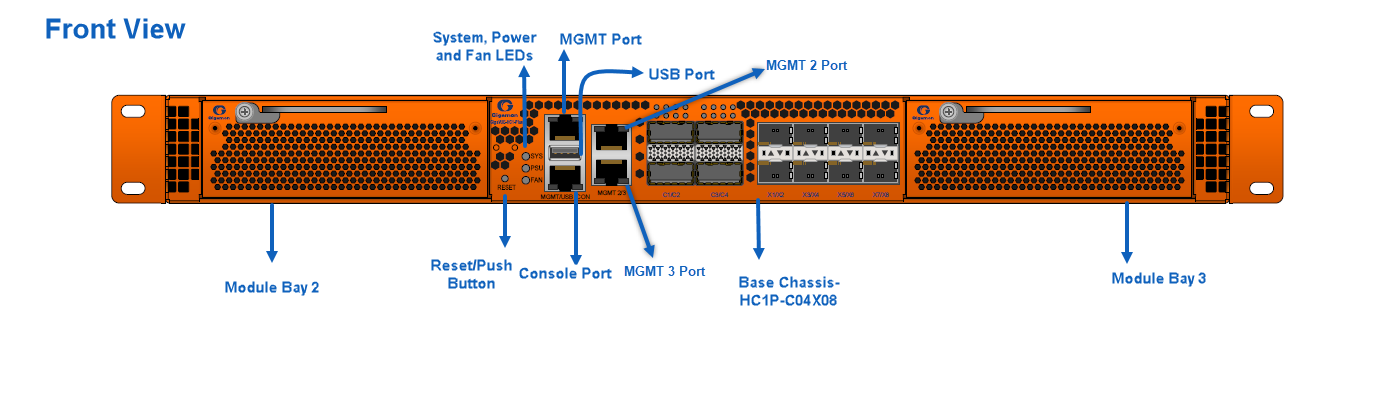
The fully-assembled GigaVUE‑HC1-Plus chassis consists of a 1RU, rack-mountable chassis with management, network, and tool ports at the front and power connections and fans at the rear. Front View of GigaVUE-HC1P Chassis summarizes the bays and components at the front, and Rear View of GigaVUE-HC1P Chassis summarizes the rear of the GigaVUE‑HC1-Plus chassis.
Note: The CLI recognizes the MGMT port as eth0, the MGMT 2 port as eth2, and the MGMT 3 port as eth1.
| 1 | Front View of GigaVUE-HC1P Chassis |
| 2 | Rear View of GigaVUE-HC1P Chassis |
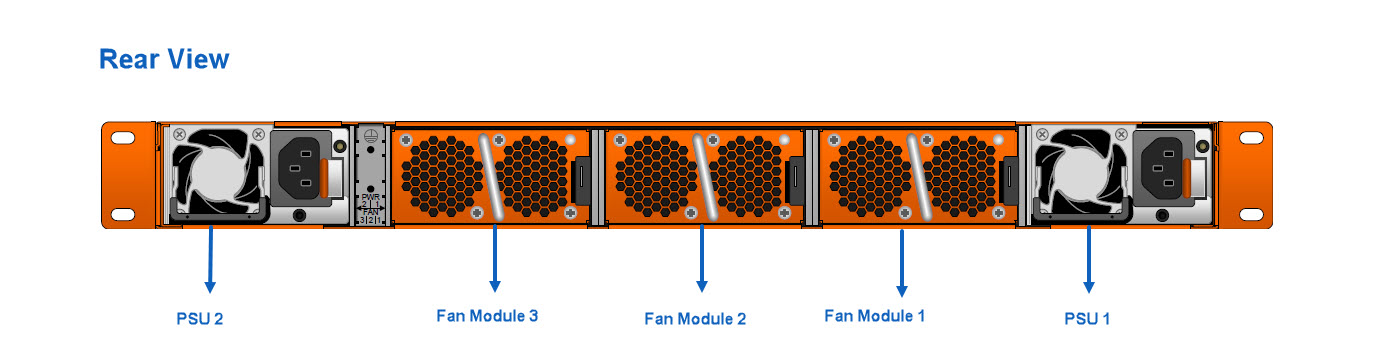
Note: The GigaVUE‑HC1-Plus chassis ships from the factory with power supply modules and fans installed. The GigaVUE‑HC1-Plus modules are shipped separately. Refer to Unpacking the GigaVUE‑HC1-Plus Shipment for assembly instructions.
|
Front Components on the GigaVUE‑HC1-Plus Chassis |
|
|
Module Bays |
The base chassis is in the center and numbered 1. Slots (bays) are numbered 2-3 from left to right. |
|
Base Chassis |
The GigaVUE‑HC1-Plus includes a base chassis that holds the management and processing components installed inside the unit. It is located in the center of the front of the chassis. Note: The base chassis is not hot-swappable. The base chassis also controls the Mgmt port and console port on the front of the node for network and local administrative access to the GigaVUE‑OS command-line interface (CLI). The base chassis provides 4x40Gb/100Gb and 8x1Gb/10Gb/25Gb support. The default port speed is 10Gb/100Gb, which is denoted by C/X. Every group of four ports (quad) can be configured as 25Gb. There cannot be a mix of 10Gb and 25Gb ports in one quad. By default, all eight ports are configured as 10Gb ports. To configure 25Gb, you must configure the port speed as follows: (config) # port 1/2/x1..x4 params admin enable (config) # port 1/2/x1..x4 params speed 25000 Refer to GigaVUE‑HC1-Plus Base Chassis for more information. |
|
Management Ports |
The MGMT and MGMT 3 ports support remote connections to the GigaVUE‑OS using SSH. MGMT 2 port is reserved for future use. |
|
Console Ports |
Initial configuration is performed in the CLI over the serial RJ-45 Console port. Serial Console port accepts terminal connections for configuration of GigaVUE‑HC1-Plus settings, including time, network, and SNMP settings. |
|
Pseudo-Slots |
GigaVUE‑HC1-Plus supports pseudo-slots . The mapping of pseudo-slots is as follows: Pseudo-slot 1 – 1/1/c1..c4,1/2/x1..x8,1/2/c1..c4 Pseudo-slot 2 – 1/1/x1..x8,1/3/x1..x8,1/3/c1..c4 To view the CLI output above, use the command |
|
Reset /Push Button |
Use the reset/push button to reset the device. It must be pressed continuously for five seconds. |
|
Rear Components on the GigaVUE‑HC1-Plus Chassis |
|
|
Power Supply Modules |
The GigaVUE‑HC1-Plus includes two separate power supply modules installed at the node's rear. Each power supply module can independently operate the GigaVUE‑HC1-Plus for 1+1 system redundancy and are hot- swappable. Separate AC and DC power units are available. Refer to Power Requirements for information on the power characteristics of the GigaVUE‑HC1-Plus. Refer to Module Removal and Replacement Procedure (Hot Removal) for more information on hot-swapping the module. |
|
SMT-HC1A-R GigaSMART Module |
The fixed rear GigaSMART line card comes with 2.0 GHz capability. Module' s ports are compatible with all features supported by GigaVUE® HC series platforms. |
|
Fan Trays |
The fan trays installed at the rear of the node provide system cooling. Fan trays are also hot-swappable. Refer to Module Removal and Replacement Procedure (Hot Removal) for more information on hot-swapping the module. |
Hardware Root of Trust (HRoT)
The Hardware Root of Trust is designed to establish a secure foundation for trust within the system using a secure microcontroller that is highly resistant to attacks. It offers the most robust form of IP security, with multiple levels of critical verification during power-on.
To configure the HRoT solution, refer to the GigaVUE-OS CLI Reference Guide.


