Virtual Machine Based Workloads
You can acquire traffic for Virtual Machines using the following ways:
- Traffic Acquisition Method using UCT-V
- Traffic Acquisition Method using Traffic Mirroring
- Traffic Acquisition Method using Customer Orchestrated Source
Traffic Acquisition Method using UCT-V
UCT-V can be deployed in various compute instances to mirror production traffic and send to GigaVUE V Series Nodes for further processing and distribution to monitoring and observability tools.
Deploying Fabric Components using GigaVUE-FM
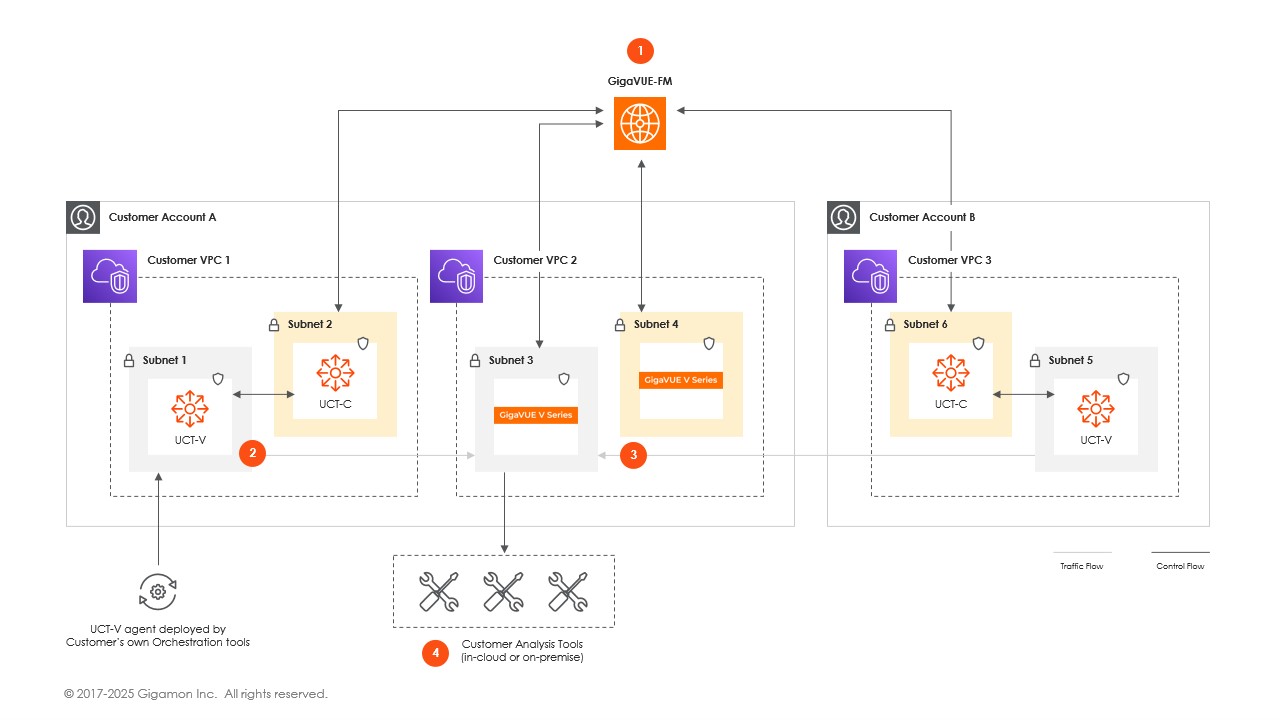
This diagram illustrates the deployment of fabric components across multiple AWS accounts, enabling traffic acquisition, processing, and forwarding to your analysis tools. GigaVUE-FM establishes control flows across accounts and VPCs, ensuring seamless integration and centralized management. GigaVUE-FM orchestrates traffic acquisition and processing by communicating with deployed components, including UCT-Vs, UCT-V Controllers, GigaVUE V Series Nodes, and Proxies.
UCT-V Controller orchestrates the communication between installed on workload VMs, captures the traffic, and forwards the traffic to GigaVUE V Series Nodes. This traffic is processed by GigaVUE V Series Nodes before being forwarded to analysis tools in the cloud or on-premises.
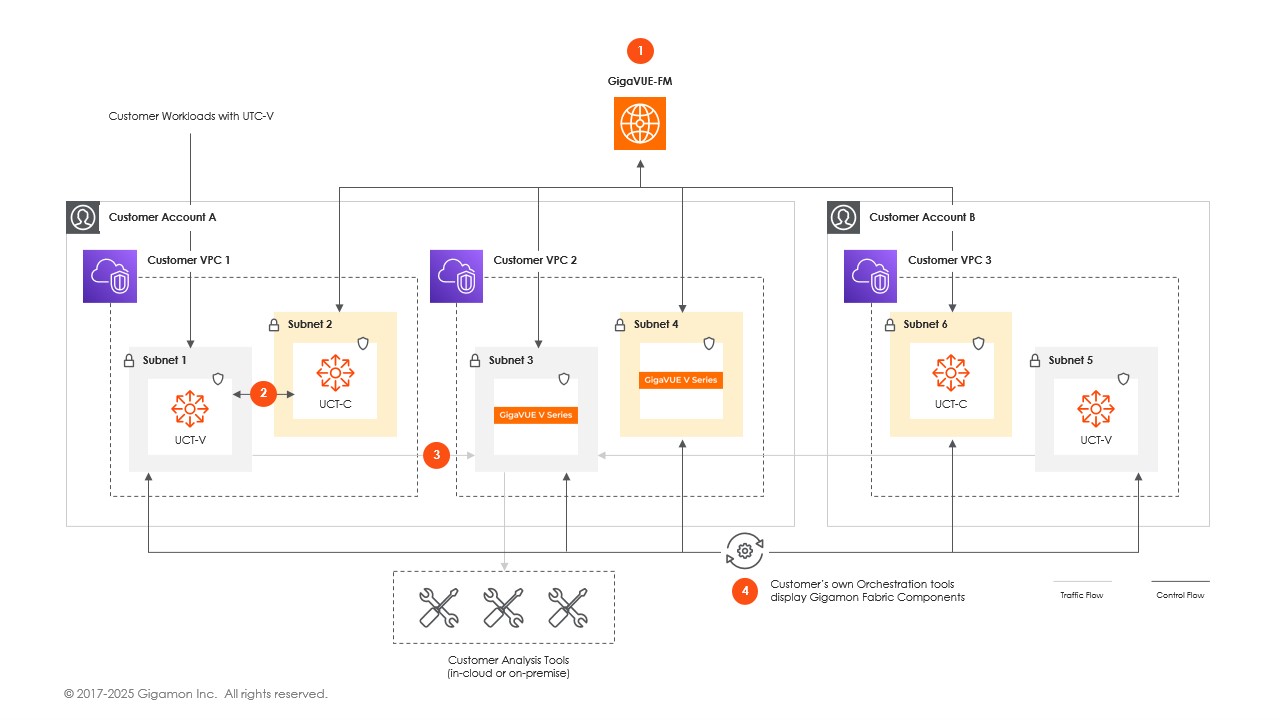
Deploy Fabric Components using Third Party Orchestration
Traffic Acquisition Method using Traffic Mirroring
With VPC Traffic Mirroring, the mirrored traffic from your workloads is directed directly to the GigaVUE V Series Nodes, and you need not configure the UCT-Vs and UCT-V Controller.
VPC Peering is required to send mirrored traffic from other VPCs into a centralized GigaVUE V Series deployment.
- UCT-V Controller configuration is not applicable for VPC Traffic Mirroring.
- Traffic Mirroring does not support cross-account solutions without a load balancer.
- For VPC Traffic Mirroring option, additional permissions are required. Refer to the Permissions and Privileges (AWS) topic for details.
- After deploying the Monitoring Session, a traffic mirror session is created in your AWS VPC consisting of a session, a filter, sources, and targets. For more details, refer to Traffic Mirroring in AWS Documentation.
Refer to the following Gigamon Validated Design for more detailed information on how to use Application Filtering Intelligence and Slicing with Traffic Mirroring:
Traffic Acquisition Method using Customer Orchestrated Source
Customer Orchestrated Source is a traffic acquisition method that allows you to tunnel traffic directly to the GigaVUE V Series Nodes. In cases where UCT-V or Traffic Mirroring cannot be configured due to firewall or other restrictions, you can still leverage GigaVUE Cloud Suite features to efficiently process and distribute acquired traffic to the tools.
When using Customer Orchestrated Source, you can directly configure tunnels or raw endpoints in the monitoring session, where you can use other applications like Slicing, Masking, Application Metadata, Application Filtering, etc., to process the tunneled traffic. Refer to Create Ingress and Egress Tunnels (AWS) and Create Raw Endpoint (AWS) for more detailed information on how to configure Tunnels and Raw End Points in the Monitoring Session.
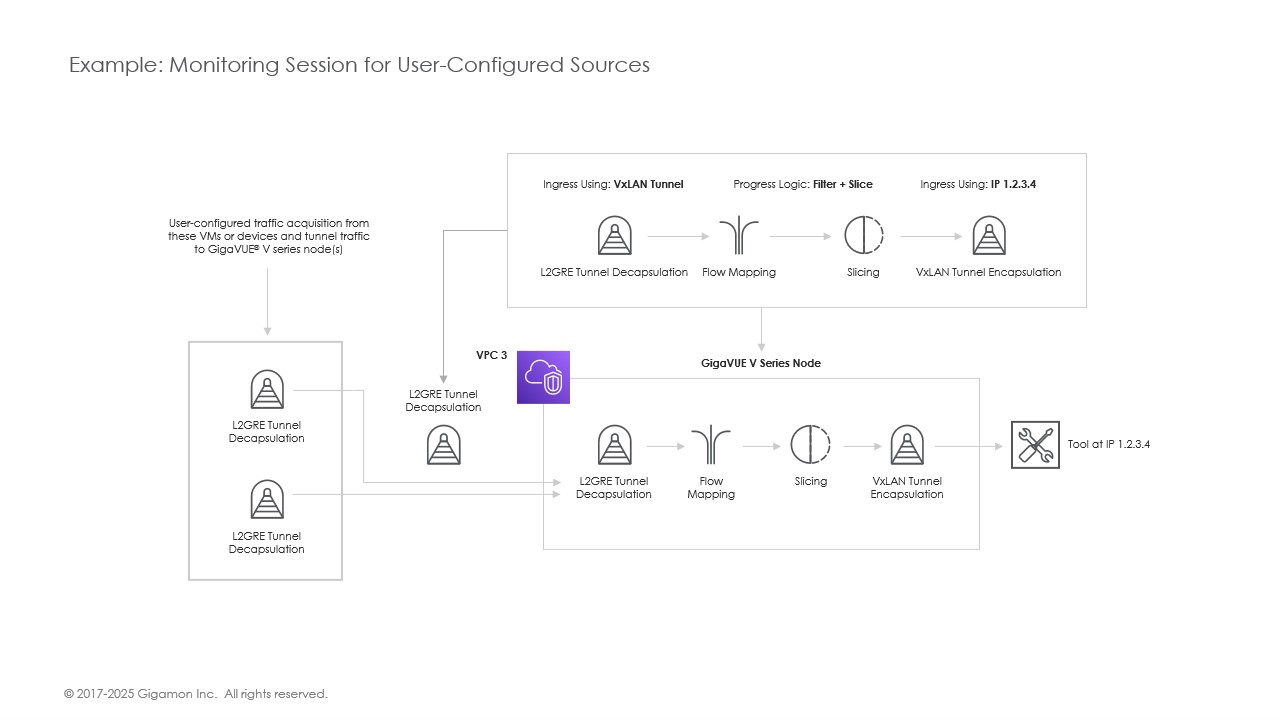
The following diagram provides more details on how customer orchestrated source works:
Ingress Tunneled Traffic
With user configured traffic acquisition, several tunnel types are available for user to ingress traffic into V Series nodes for processing: VxLAN, L2GRE or ERSPAN. User chooses the type and detailed configuration of ingress tunnel endpoint that works best in their environment.
If you select Customer Orchestrated Source as the tapping method, you can use the Customer Orchestrated Source as a source option in the monitoring session, where the traffic is directly tunneled to the GigaVUE V Series nodes without deploying UCT-Vs and UCT-V Controller. You must create this tunnel feed and point it to the GigaVUE V Series Node(s).
You can configure an Ingress tunnel in the Monitoring Session with the GigaVUE V Series Node IP address as the destination IP address, then the traffic is directly tunneled to that GigaVUE V Series Node.
Refer to Create a Monitoring Domain for more detailed information on how to select Traffic Acquisition Method as Customer Orchestrated Source.


