Groups of GigaSMART Engine Ports
To access GigaSMART within GigaVUE‑FM, access a device that has been added to GigaVUE‑FM from the GigaVUE‑FM interface. GigaSMART appears in the navigation pane of the device view on supported devices. Refer to Access GigaSMART from GigaVUE‑FM for details.
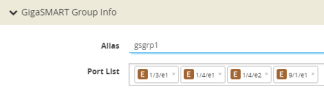
Use the GigaSMART Group page to create groups of GigaSMART engine ports in a given GigaVUE-OS and GigaVUE‑FM chassis. (To go to the GigaSMART Group page, select GigaSMART > GigaSMART Groups > GigaSMART Groups > New.)
Note: You cannot create a new group of GigaSMART engine ports when no GigaSMART engine ports are available on the device.
The GigaSMART engine ports in a GigaSMART group can be on different line cards or modules in the same GigaVUE‑HC3 chassis. However, all GigaSMART engine ports must be on the same chassis.
Use groups of GigaSMART engine ports to increase the processing power of GigaSMART. The processing power of the GigaSMART engine ports is as follows:
| Each of the two GigaSMART engine ports in an SMT-HC3-C05 module on GigaVUE‑HC3 can process packets at up to 100Gb. |
| Each of the two GigaSMART engine ports in an SMT-HC3-C08 module on GigaVUE‑HC3 can process packets at up to 200Gb. |
| The GigaSMART engine port in the GigaVUE‑HC1 node can process packets at up to 20Gb. |
| The GigaSMART engine port in the GigaVUE‑HC1 Gen3 can process packets at up to 80Gb. |
| The GigaSMART engine port in the GigaVUE‑HC1-Plus node can process packets at up to 100Gb. |
| The GigaSMART engine port in the GigaVUE-HCT Gen3 can process packets at up to 80Gb. |
The number of GigaSMART engine ports are as follows:
| Each GigaSMART-HC0 module includes one GigaSMART engine port. |
| Each SMT-HC3-C05 module on GigaVUE‑HC3 includes two GigaSMART engine ports. |
| The GigaVUE‑HC1 node includes one GigaSMART engine port. |
| The GigaVUE‑HC1-Plus node includes one fixed GigaSMART module. |
The number of GigaSMART engine ports available in a chassis depends on the number of GigaSMART line cards or modules in the chassis as follows:
| Up to four modules in the GigaVUE‑HC3 (eight GigaSMART engine ports). |
| One module in GigaVUE‑HC1 (one engine port). |
| Up to two modules in GigaVUE-HC1 Gen 3 (two GigaSMART engine ports). |
| One module in GigaVUE-HCT Gen3 (one engine port). |
The following table provides a summary:
|
GigaVUE-OS and GigaVUE‑FM Node |
Maximum GigaSMART Line Cards or Modules per Node |
Number of GigaSMART engine ports per Line Card or Module |
Maximum Number of GigaSMART engine ports in a GigaSMART group (gsgroup) |
|
GigaVUE‑HC3 |
4 |
2 |
8 |
|
GigaVUE‑HC1 |
1 built-in |
1 |
1 |
|
GigaVUE‑HC1 Gen3 |
2 |
1 |
2 |
|
GigaVUE‑HC1-Plus |
1 built-in rear module, 1 |
2 |
2 |
|
GigaVUE-HCT Gen3 |
1 built-in front |
1 |
1 |
Note: Grouping Generation 3 and Generation 2 cards is not supported.
Note: On supported GigaVUE HC Series platforms with Generation 3 GigaSMART cards, you can use the GigaSMART Groups page to reload one or more GigaSMART engine ports in a group. This provides a granular way to reset only the engines in a selected group without reloading the entire chassis or GigaSMART card. Reload is not available on Generation 2 cards or on GigaSMART Appliance (GSA).
Engine grouping for GTP is a special case, which is described in GTP Engine Grouping.
GigaSMART engine ports are numbered with an e prefix using <bid/sid/e1..e2> nomenclature, such as 1/1/e1. For example:
s
Reload GigaSMART engine ports in a group
On supported GigaVUE HC Series devices with Generation 3 GigaSMART cards, you can reload one or more GigaSMART engine ports in an existing GigaSMART group. Reloading a group restarts the selected engines in that group without rebooting the chassis or the GigaSMART card.
Use this operation to recover or troubleshoot a group while minimizing impact to other traffic.
To reload GigaSMART engine ports in a group:
1. In GigaVUE-FM, navigate to the device and select GigaSMART > GigaSMART Groups.
2. On the GigaSMART Groups page, select the GigaSMART group (gsgroup) that you want to reload.
3. From the Actions menu, choose Reload.
4. In the reload dialog:
| Review the list of GigaSMART engine ports that belong to the selected group. |
| By default, all ports are selected. |
| To minimize impact, clear any engine ports that you do not want to reload so that only the affected engines are reloaded. |
5. If the group is configured for an Inline traffic then a is displayed, review the warning that reload will impact traffic on that group and proceed only if you have planned for a brief disruption.
6. Click **Apply** to start the reload.
Only the selected GigaSMART engine ports in the group are reloaded; other groups and unrelated traffic on the device continue to run. The reload is a software-level restart of the engines and does not reboot the chassis or the GigaSMART card.
 MORE INFORMATION


