Deployment Options for GigaVUE Cloud Suite for AWS - Integrated Mode
This section describes various options to configure GigaVUE Cloud Suite for AWS to provide visibility for both physical and virtual traffic. You can configure GigaVUE Cloud Suite for AWS in ten different ways, based on the traffic acquisition method and your approach to deploying fabric components.
Different deployment options for GigaVUE Cloud Suite for AWS based on the Traffic Acquisition Method
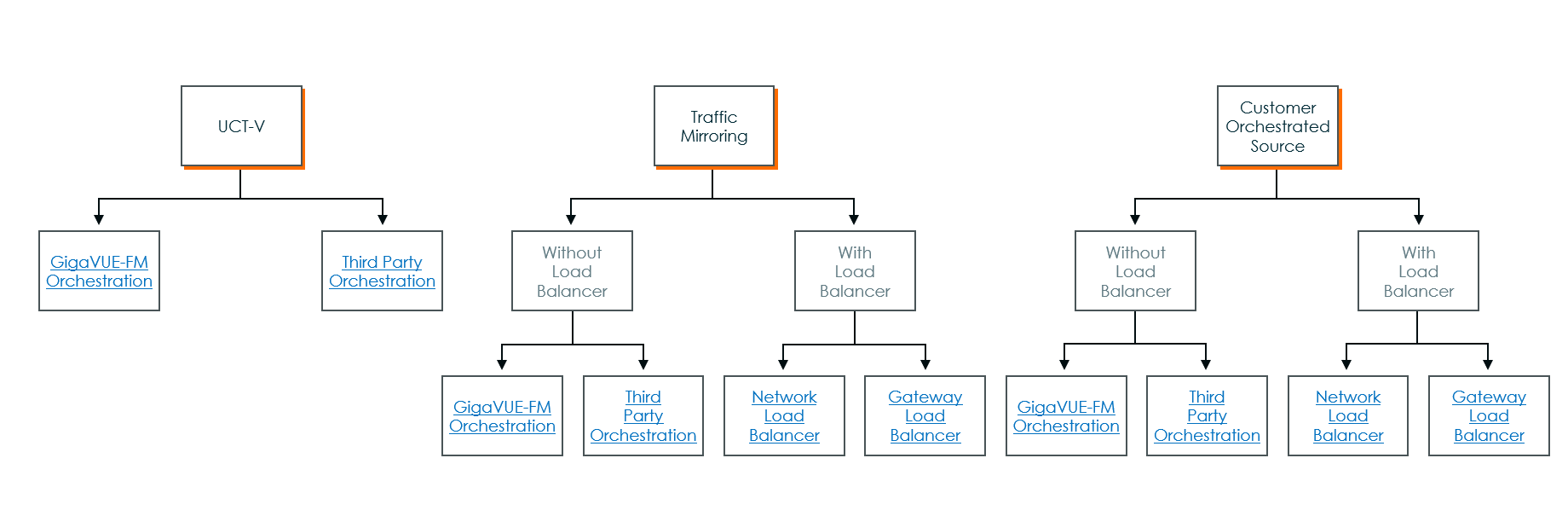
Prerequisite:
Before deploying GigaVUE Fabric Components in AWS, create a Monitoring Domain in GigaVUE‑FM with the Use FM to Launch Fabric toggle button disabled.
Key Considerations:
- When you deploy the fabric components using third party orchestration, you cannot delete the Monitoring Domain without unregistering the registered fabric components.
- When using Traffic Mirroring as the traffic acquisition method, you must add a key and value when deploying the respective fabric components in the AWS orchestrator. Set the key to GigamonNode and any string to the value. The string cannot contain numbers and special characters.
- GigaVUE V Series Node must have a minimum of two Network Interfaces (NIC) attached to it, a management NIC, and a data NIC. You can add both interfaces when deploying the GigaVUE V Series Node in AWS. For details, refer to the Launch an instance using the Launch Instance Wizard topic in Amazon EC2 Documentation.
- When GigaVUE‑FM is 6.10.00 or above and the Fabric Components are on (n-1) or (n-2) versions, you must create a Username and Password instead of using tokens in the registration data. For more details, refer to Configure Role-Based Access for Third Party Orchestration.
- You must configure a token in the User Management page. For details, refer to Configure Tokens.
 MORE INFORMATION


