Configure Fabric Map Settings
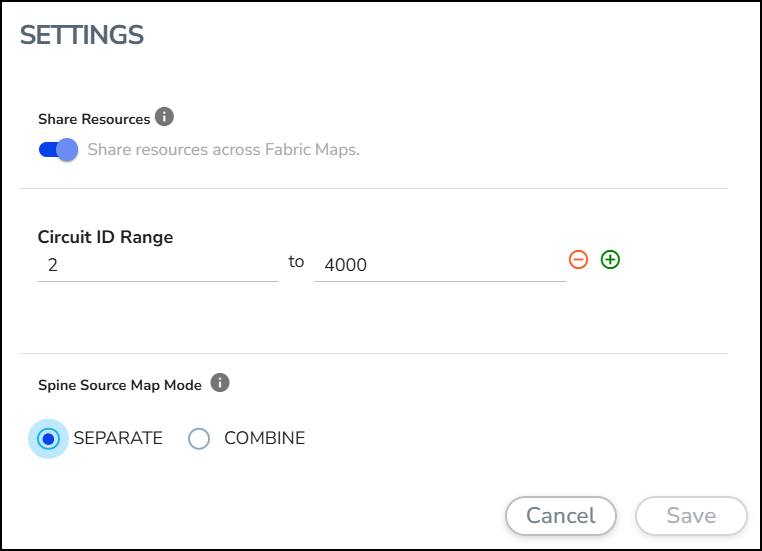
Share Circuit ID Resource
You can share the circuit id resources for the Fabric Maps created for the same destination. To do this:
| 1. | Select the Settings icon on the top navigation bar to open the Share Resources dialog. |
| 2. | Enter the Circuit Id Range (Min and Max values). Use the +/- icon to increment/decrement the circuit id range. |
| 3. | Click Save to save the settings. |
The Share Resources option is enabled by default. Use the toggle bar to disable this option.
When you change the option from shared to non-shared, a note message appears. Click OK to proceed and type Yes in the confirmation message to change from Shared to Non-Shared. You can use this option only if you who have Read and Write privileges in both the Traffic Control Management and GigaVUE-FM Security Management.
Spine Source Map Mode
You can configure this global setting in FM that controls how cluster‑local maps are created in a leaf-and-spine cluster when the source is at the spine (i.e., a decap circuit GigaStream in a leaf‑spine cluster). This setting is applicable for creation of the first map that uses the spine mode. Refer to Supported Topologies topic for more information on topology of Spine Source Map mode.
The following image shows the Spine Source Map Mode in the SETTINGS dialog.
When a leaf‑and‑spine cluster acts as a middle or destination cluster in a fabric map, its cluster‑level map source can be one or more circuit GigaStreams.
If these circuit GigaStreams are on the cluster’s spine nodes, you can create the map in the leaf‑and‑spine cluster in one of two ways:
| COMBINE - A single map that combines the circuit GigaStreams from all spine nodes |
| SEPARATE - Multiple maps, with one map per spine node’s circuit GigaStream. This is the default mode. |
Note: Use SEPARATE mode when the map destination is on nodes that are connected to all spine nodes.
Use COMBINE mode to optimize fabric map deployments so that the cluster can use a single logical map to forward the traffic to the destination, even when traffic arrives via multiple decap circuit GigaStream on the spine nodes.
Limitations of Spine Source Map Mode
| If existing maps are in SEPARATE mode, the future maps from the same circuit GigaStream continue to be SEPARATE even if the global mode is switched to COMBINE. |
| If existing maps are in COMBINE mode, the future maps from the same circuit GigaStream to be COMBINE even if the global mode is switched to SEPARATE. |
| To truly change mode for the circuit GigaStream, you must delete the existing maps and recreate them after changing the global setting. |


