Configure Map Settings
You can configure the map settings to control how resources, spine source maps, configuration synchronization, and circuit ID ranges are handled for traffic flows.
The following image shows the Maps Settings dialog in Traffic Policy.
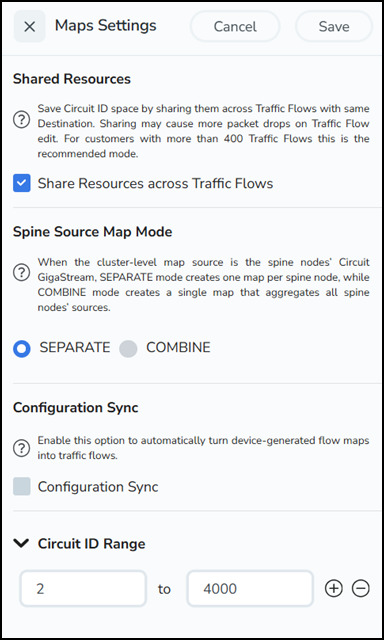
Share Circuit ID Resource
You can share the circuit ID resources for the flow maps created for the same destination. To do this:
| 1. | Select the Settings icon on the top right corner of the Traffic Policy landing page to open the Map Settings dialog. |
| 2. | Select Share Resources Across Traffic Flows option to share the circuit ID resources. |
| 3. | Enter the Circuit ID Range (Min and Max values). Use the +/- icon to add or remove the circuit ID ranges. |
| 4. | Click Save to save the settings. |
When you change the option from shared to non-shared, a note message appears. Enter Yes in the confirmation message and click OK to change from Shared to Non-Shared. You can use this option only if you who have Read and Write privileges in both the Traffic Control Management and GigaVUE-FM Security Management.
Spine Source Map Mode
You can configure this global setting in FM that controls how cluster‑local maps are created in a leaf-and-spine cluster when the source is at the spine (i.e., a decap circuit GigaStream in a leaf‑spine cluster). This setting is applicable for creation of the first map that uses the spine mode. Refer to Supported Topologies topic for more information on topology of Spine Source Map mode.
When a leaf‑and‑spine cluster acts as a middle or destination cluster in a fabric map, its cluster‑level map source can be one or more circuit GigaStreams. If these circuit GigaStreams are on the cluster’s spine nodes, you can create the map in the leaf‑and‑spine cluster in one of two ways:
| COMBINE - A single map that combines the circuit GigaStreams from all spine nodes |
| SEPARATE - Multiple maps, with one map per spine node’s circuit GigaStream. This is the default mode. |
Note: Use SEPARATE mode when the map destination is on nodes that are connected to all spine nodes.
Use COMBINE mode to optimize fabric map deployments so that the cluster can use a single logical map to forward the traffic to the destination, even when traffic arrives via multiple decap circuit GigaStream on the spine nodes.
Limitations of Spine Source Map Mode
| If existing maps are in SEPARATE mode, the future maps from the same circuit GigaStream continue to be SEPARATE even if the global mode is switched to COMBINE. |
| If existing maps are in COMBINE mode, the future maps from the same circuit GigaStream to be COMBINE even if the global mode is switched to SEPARATE. |
| To truly change mode for the circuit GigaStream, you must delete the existing maps and recreate them after changing the global setting. |
Configuration Sync
You can enable this option to automatically turn device-generated flow maps into Traffic Policy.


