Introducing the GigaVUE‑TA25E Chassis
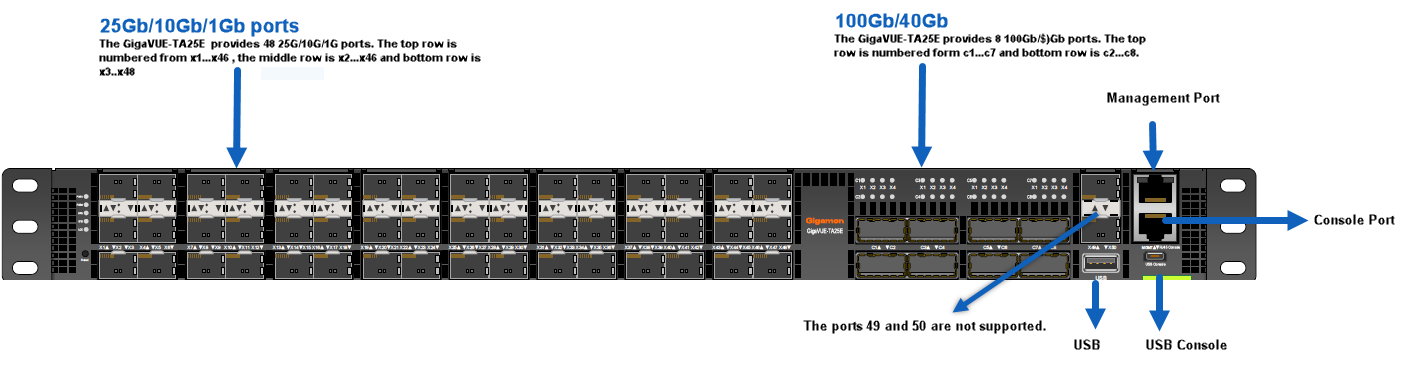
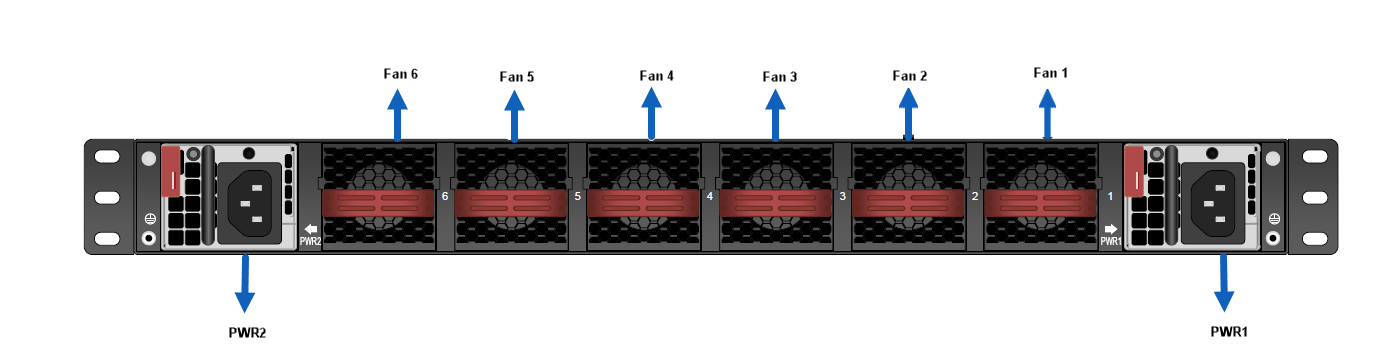
The GigaVUE‑TA25E chassis consists of a 1RU, rack-mountable, 19" wide chassis with network, tool, management, and console ports at the front and power connections and fan module at the rear. Refer to GigaVUE‑TA25E Ports and Description for a description of each of the port.
| 1 | Front View |
| 2 | Rear View |
GigaVUE‑TA25E Ports and Description
|
Port |
Description |
|---|---|
|
Management |
Use the Mgmt port for remote configuration of the GigaVUE‑TA25E Traffic Aggregator over a 1000 Ethernet network. Refer to the installation guide for information on establishing an SSH configuration session with the GigaVUE‑TA25E Traffic Aggregator. |
|
Console |
Use the Console port for local configuration of the GigaVUE‑TA25E Traffic Aggregator over a serial connection. The serial settings are 8N1,115,200 bps. Refer to installation guide for information on establishing a serial configuration session with the GigaVUE‑TA25E Traffic Aggregator in a terminal window. |
|
USB Console |
The USB Console is an alternative of RJ45 console port that would allow you to access GigaVUE‑TA25E. |
|
Ports x1...x48 |
The GigaVUE‑TA25E provides 48 25Gb/10Gb/1Gb ports ( x1..x48). For details about the supported transceivers and cable type, refer to the “GigaVUE Interoperability Matrix”. The 24-port GigaVUE‑TA25E is called GigaVUE-TA25EA. Refer to the Port Licensing section for license information to expand the 24-port GigaVUE-TA25EA to 48 25Gb/10Gb/1Gb ports and to enable eight 100Gb/40Gb ports. By default, all forty eight ports are configured as 10Gb ports. To configure 25Gb, you must configure the port speed as follows: (config) # port x1..x4 params admin enable (config) # port x1..x4 params speed 25000 Refer to the Quadrant Port Speed Limit below. |
|
Ports c1...c8 |
GigaVUE‑TA25E also includes 8 100Gb/40Gb ports (c1..c8). |
|
Ports x49...x50 |
The GigaVUE‑TA25E chassis provides two additional 10Gb ports (x49...x50) on the right side that are not yet supported. |
|
Pseudo-Slots |
GigaVUE‑TA25E supports two pseudo-slots. The mapping of pseudo-slots is as follows: Pseudo-slot 1 – 1/1/x1..x39, x42 Pseudo-slot 2 – 1/1/x40...41, 1/1/x43.....x48, 1/1/c1..c8 To view the CLI output above, use the command |
|
Reset Button |
This button on the front panel next to Gigamon logo allows you to reset GigaVUE‑TA25E without having to unplug both PSU’s. Push and hold the button for 5 seconds to reset. |
|
Transceivers |
For details about the supported transceivers and cable type, refer to the GigaVUE-OS Compatibility and Interoperability Matrix |
Quadrant Port Speed Limit
The GigaVUE‑TA25E ports follow a Quadrant port speed limit. The grouping is as shown in below figure:

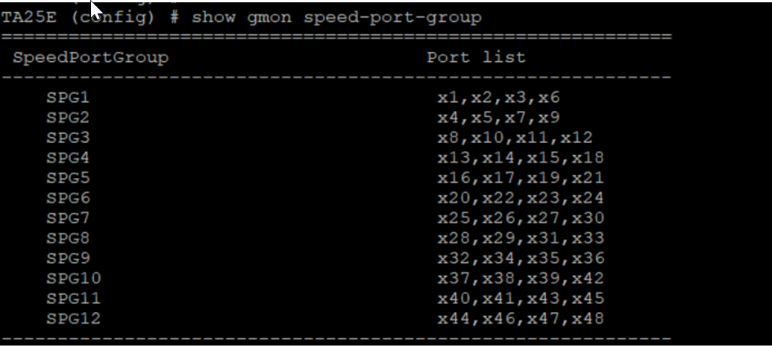
You can categorize the quadrant ports into speed port groups, such as :
| Speed Group 1- x1,x2,x3,x6 |
| Speed Group 2- x4,x5,x7,x9 |
| Speed Group 3- x8,x10,x11,x12 |
| Speed Group 4- x13,x14,x15,x18 |
| Speed Group 5- x16,x17,x19,x21 |
| Speed Group 6- x20,x22,x23,x24 |
| Speed Group 7- x25,x26,x27,x30 |
| Speed Group 8- x28,x29,x31,x33 |
| Speed Group 9- x32,x34,x35,x36 |
| Speed Group 10- x37,x38,x39,x42 |
| Speed Group 11- x40,x41,x43,x45 |
| Speed Group 12- x44,x46,x47,x48 |
Each port in a quadrant speed group operates at the same configured speed. For example, if you set port x1 to 25 Gb, you must also set ports x2, x3, and x6 in that quadrant to 25 Gb. A quadrant cannot mix 10 Gb and 25 Gb ports.
To view the CLI output utilize the command show gmon speed-port-group
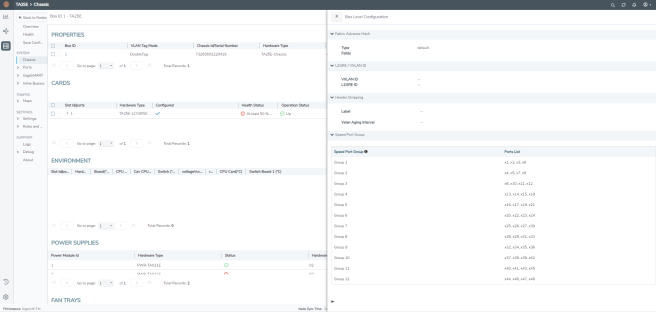
To view the same in GigaVUE-FM, on the left navigation pane:
| 1. | Click  . . |
| 2. | Select Physical>Nodes >System> Chassis. |
| 3. | Select Box Level Configuration > Speed Port Group. The speed groups lists as shown below. |