TAP-HC1-G10040 Module
The TAP-HC1-G10040 module provides four 1000Mb/100Mb/10Mb Copper TAP connections to be used as network ports.
-
This module has eight ports, enabling four TAPs.
-
Each port pair is arranged with one port above the other, providing bidirectional traffic flow between two nodes.
-
Traffic is copied through the use of a port pair, unless the port pair is in the physical bypass state.
-
The hot-swap button is not supported. But the modules are hot-swappable. Refer to Hot Swapping Modules for instructions.
Before installing the TAP-HC1-G10040 Module, the GigaVUE-HCT must be running software version 6.5 or higher. Refer to 1 TAP-HC1-G10040 Module.
For details about the connectivity specifications, refer to “GigaVUE-OS Compatibility and Interoperability Matrix”.
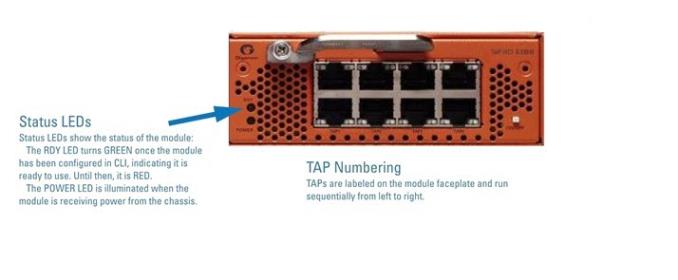
| 1 | TAP-HC1-G10040 Module |
Using the TAP-HC1-G10040 Module for Copper Bypass
You can configure the network ports on the TAP-HC1-G10040 module through software to be inline network ports. This allows the TAP-HC1-G10040 module to act as a copper bypass module, providing protected inline networks for copper ports.
To use the copper bypass functionality, the GigaVUE-HCT must be running GigaVUE‑OS version 6.5 or higher. For configuration information, refer to the chapter “Configuring Inline Bypass Solution on GigaVUE TAP Modules” in the GigaVUE-OS CLI Reference Guide.


