Application Metadata Exporter
Application Metadata Exporter (AMX) is an Application Intelligence component that runs on GigaVUE V Series Nodes and works with Application Metadata Intelligence (AMI) and other telemetry sources to deliver standardized metadata to your monitoring and analytics tools.
GigaVUE‑FM manages both AMX and AMI and provides a central point to deploy, configure, and monitor AMX across on‑premises and cloud environments.
You can use AMX to:
| Transform and export application metadata in JSON and Parquet formats to cloud-native tools/data lakes. |
| Transform and export NetFlow/IPFIX, and mobility metadata in JSON format to cloud-native tools and Kafka-based data pipeline. |
| Enrich mobile‑network metadata for 3G/4G/5G visibility and analytics. |
| Enrich AMI records with cloud and Kubernetes workload metadata with host, environment, and container context for reducing Mean Time To Identification (MTTI) and Mean Time To Resolution (MTTR). |
Refer to the following topics for more detailed information on the various deployment options and scenarios:
Application Metadata Exporter Deployment Options
The output from the Application Metadata Intelligence or GTP Correlation Engine is sent to the AMX application, which exports it to the tools in JSON format over HTTPS/Kafka. AMX application is always deployed in GigaVUE V Series Node. The GigaSMART application sending data to the AMX application can be on GigaVUE HC Series or the GigaVUE V Series Node. Based on where the GigaSMART applications reside, there can be four deployment methods:
Note: For exporting GigaVUE Enriched Metadata for Cloud Workloads, AMI should be deployed in GigaVUE V Series Nodes.
| Hardware (AMI) |
| Hardware (Control Plane Metadata) |
| Virtual (VMware, Nutanix, KVM) |
On-Premises
Hardware (AMI)
In hardware deployments, the Application Metadata Intelligence (AMI) runs on a physical node/cluster, and the AMX application is deployed on a GigaVUE V Series Node running on VMware ESXi, OpenStack, or Nutanix. The output from the AMI in CEF format is sent to the AMX application in GigaVUE V Series Node. GigaVUE-FM handles the orchestration of the configuration between the Gigamon devices. The following devices support the integration of AMX application:
- GigaVUE-HC1
- GigaVUE-HC3
- GigaVUE‑HC1-Plus
- GigaVUE-HCT
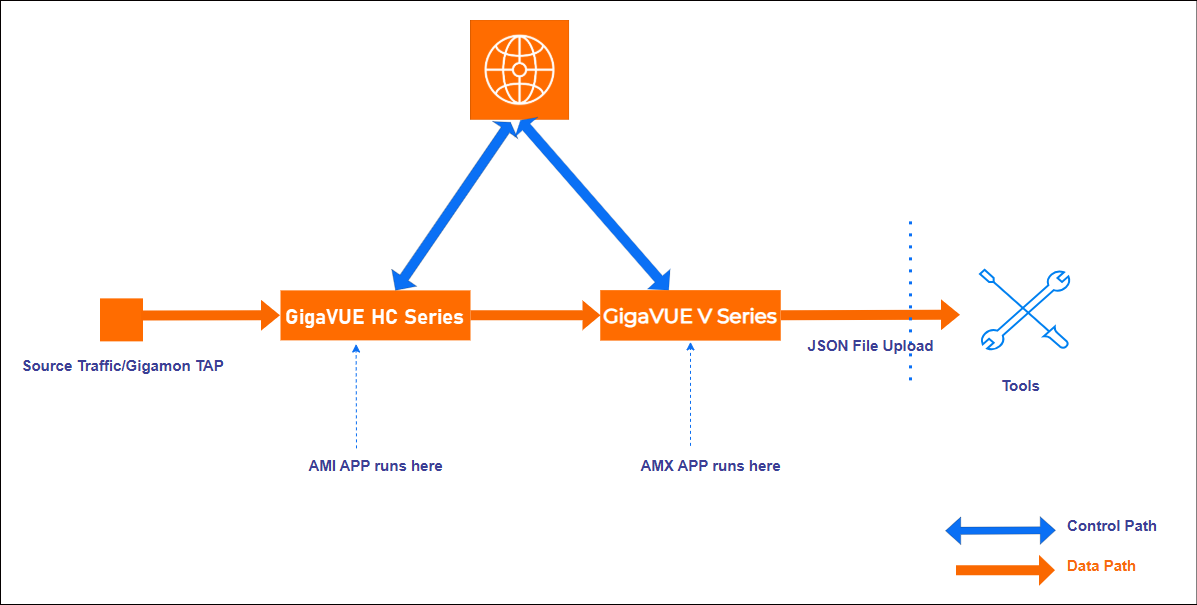
Hardware (Control Plane Metadata)
In hardware deployments, the GTP Correlation Engine runs on a physical node/cluster, and the AMX application is deployed on a GigaVUE V Series Node running on VMware ESXi/KVM and Nutanix. The output from the GTP Correlation Engine in Flat JSON format is sent to the AMX application in GigaVUE V Series Node. The performance of the device and the application is managed by GigaVUE-FM. The GigaVUE-HC3 Gen3 devices support the integration of AMX application.
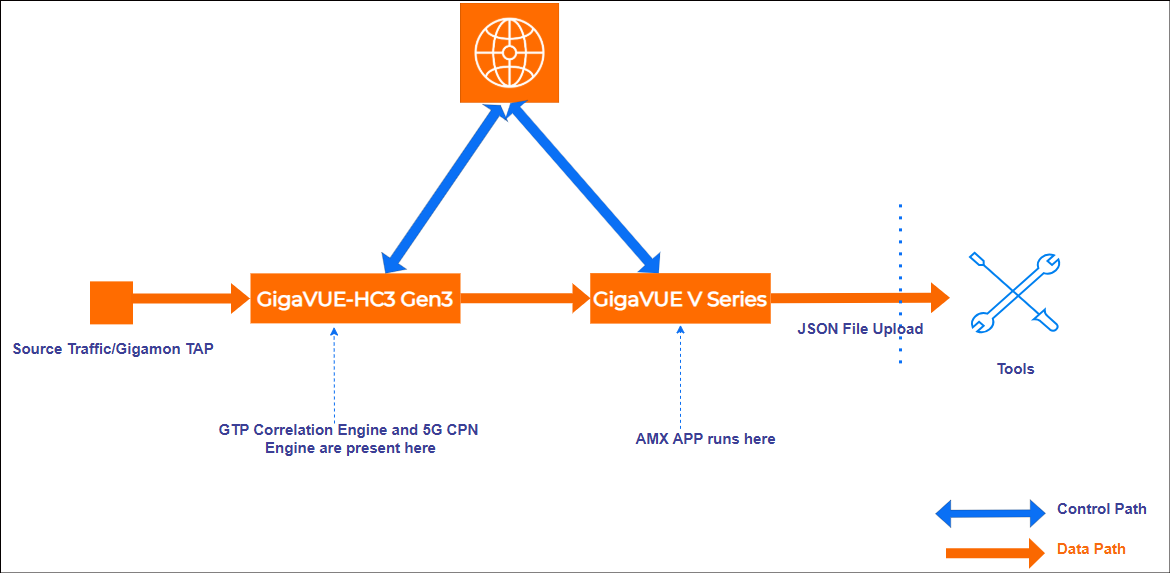
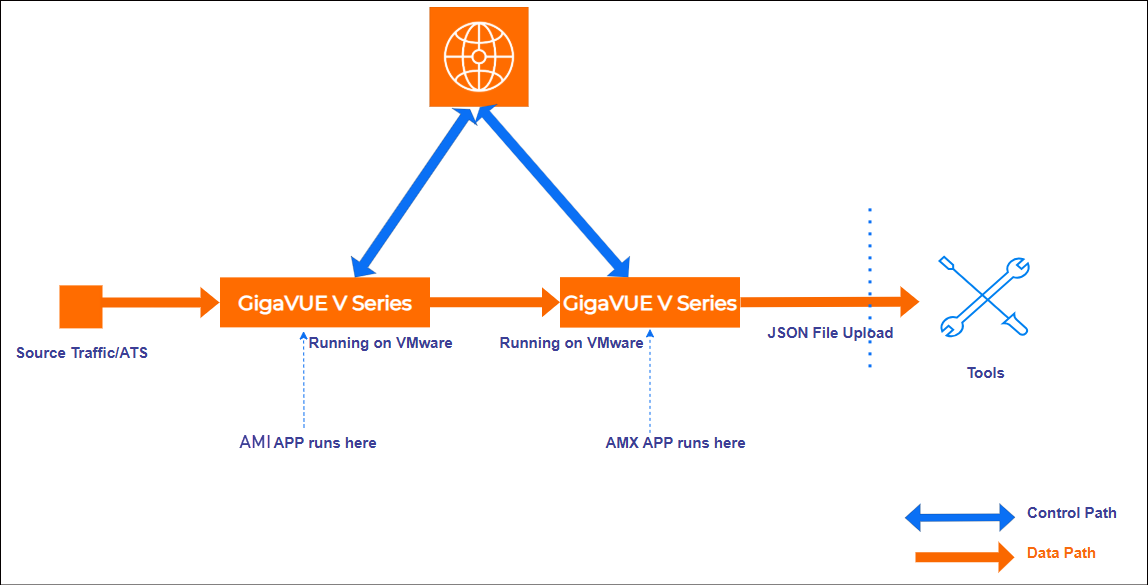
Private Cloud (VMware)
In the Private Cloud environment, the application is supported only on VMware ESXi/KVM and Nutanix and can be deployed in the VMware as shown in the diagram.
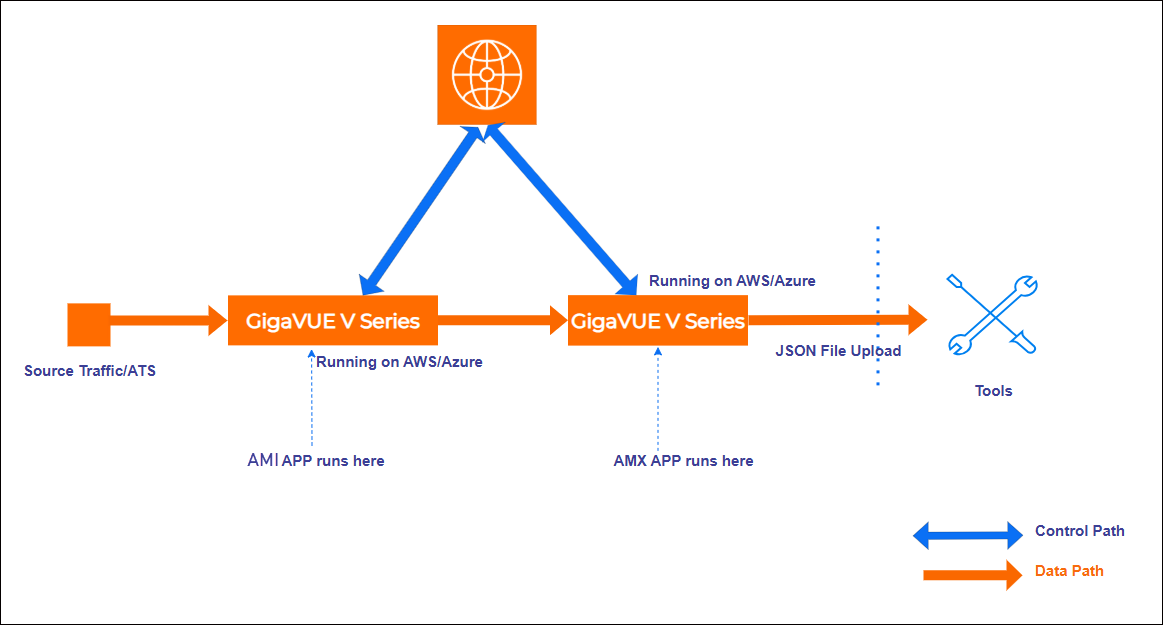
Public Cloud
In the Public Cloud environment, the application is supported on AWS and Azure platforms, and can be deployed as shown in the diagram:
Application Metadata Exporter - Export Scenarios
Refer to the following topics for more detailed information on the various ways to configure AMX:
- Export Application Metadata in JSON format over HTTPS/Kafka
- Transform NetFlow/IPFIX records to JSON format and export over HTTPS/Kafka
- Export of 3G/4G/5G Control Plane Metadata by AMX
- Export GigaVUE Enriched Metadata for Mobile Networks and Export over HTTPS/Kafka
- Export GigaVUE Enriched Metadata for Cloud Workloads and Export over HTTPS/Kafka
Export Application Metadata in JSON format over HTTPS/Kafka
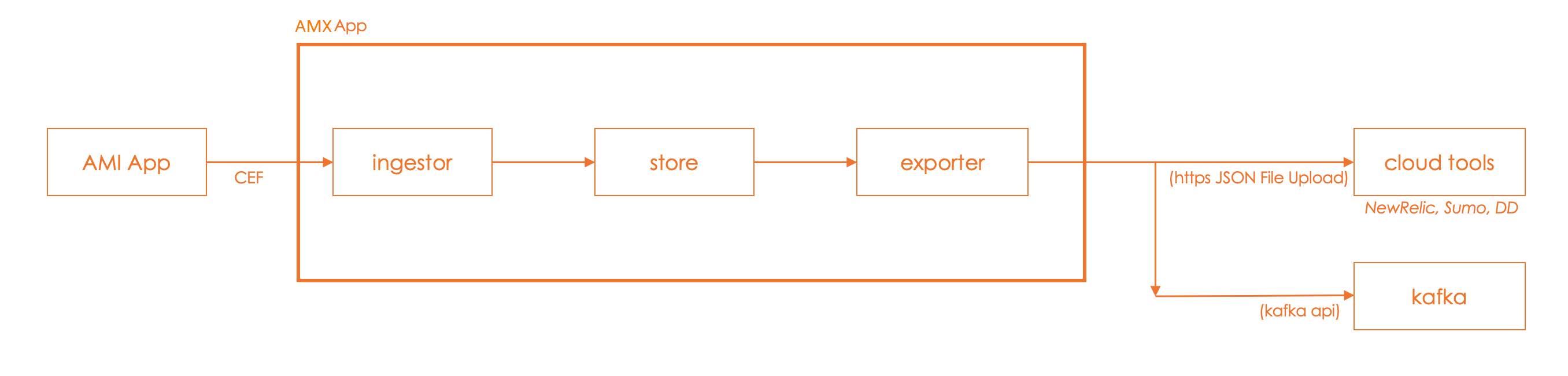
Application Metadata Exporter (AMX) application converts the output from the Application Metadata Intelligence (AMI) in CEF format into JSON format and sends it to the cloud tools and Kafka Consumers. The following image illustrates this end‑to‑end flow.
Transform NetFlow/IPFIX records to JSON format and export over HTTPS/Kafka
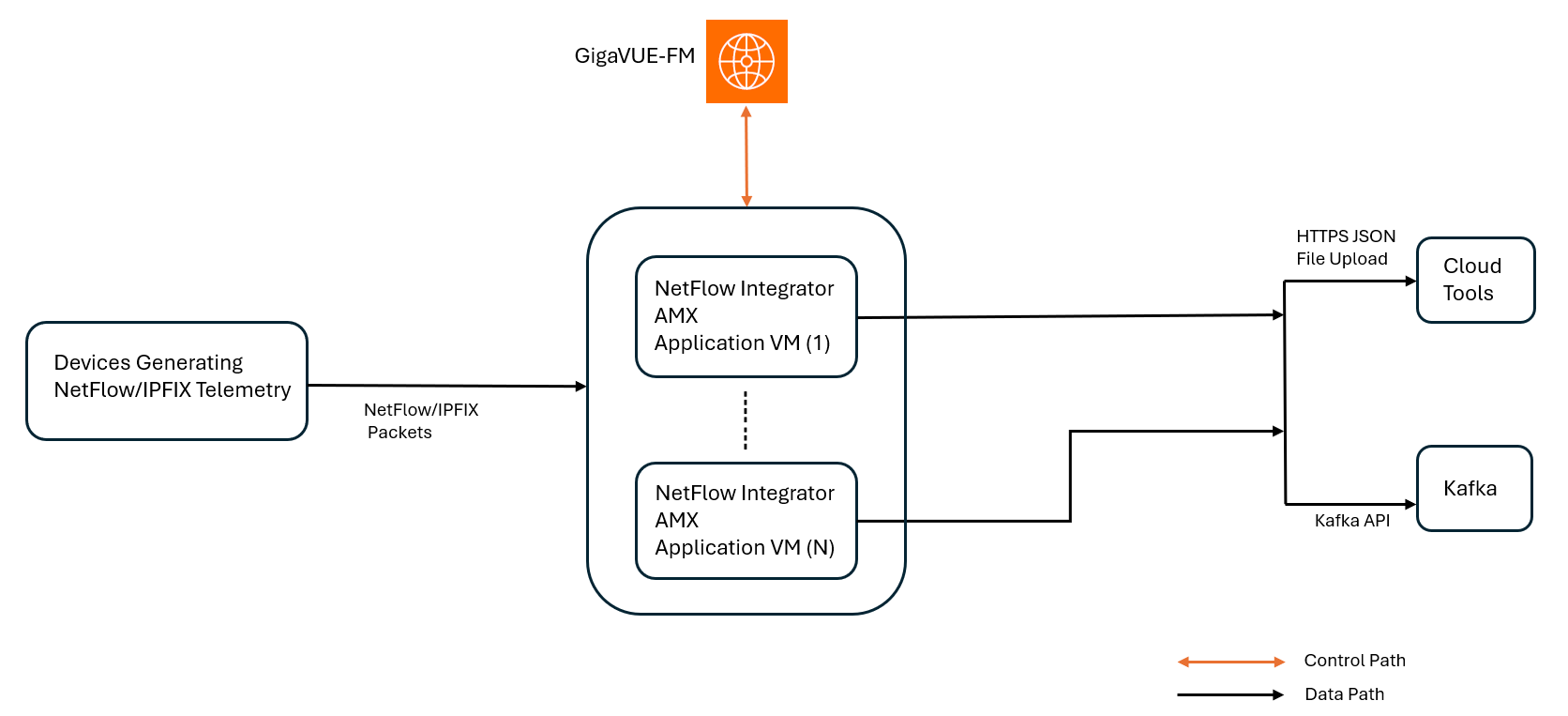
The AMX application with NetFlow Integrator functionality supports ingesting NetFlow/IPFIX flow records from various sources and devices, such as firewalls, routers, and switches, including AMI. It normalizes these records into JSON and exports them to external tools, providing a consolidated view of network traffic and NetFlow/IPFIX insights in a standard format compatible with most Network Performance Monitoring (NPM) tools.
The following image illustrates how the NetFlow Integrator collects NetFlow/IPFIX telemetry from network devices, converts it into JSON, and exports it over HTTPS or Kafka to external cloud tools. GigaVUE-FM acts as the central control system for AMX.
Supported Platforms
-
VMware ESXi
-
VMware NSX-T
Important Notes
| NetFlow v9 and v5 Timestamps: |
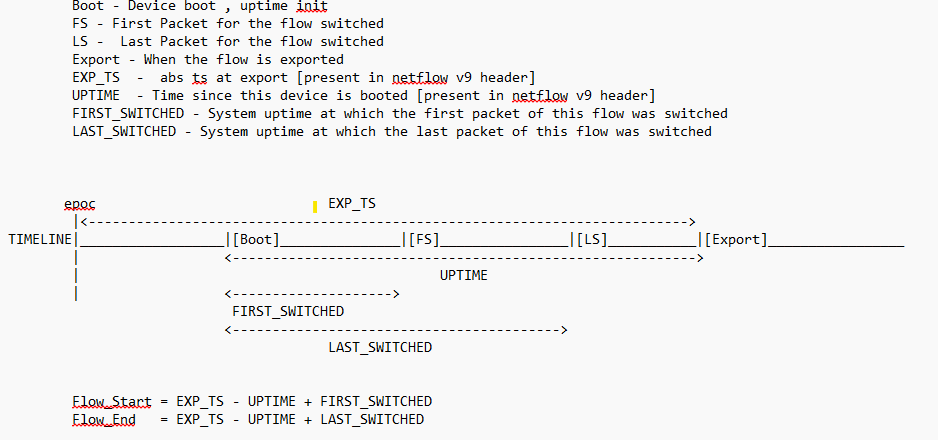
| The NetFlow header contains system uptime (in seconds) and an export timestamp. |
| Flow start time is derived using the following formula: |
| • | Flow_Start = Export Timestamp - System Uptime + First_Switched |
| Flow end time is derived using the following formula: |
| • | Flow_End = Export Timestamp - System Uptime + Last_Switched |
| The calculated start and end time are converted into nanoseconds. |
| Unsupported attributes such as flow start/end in milliseconds, microseconds, or nanoseconds will be ignored. Instead, the export timestamp is used as both the flow start and end times, which are then converted to nanoseconds. |
| NetFlow v10/IPFIX Timestamps: |
| NetFlow v10/IPFIX directly incorporates timestamps without the need for system uptime. |
| Even if Flow start and end timestamps are available in seconds, milliseconds, microseconds, or nanoseconds, they are always converted to nanoseconds for output. |
| Missing Flow Start/End Attributes - For records that do not include flow start or end attributes, AMX automatically assigns both values to the export timestamp. |
The image below explains how flow start and end times are calculated using system uptime, export timestamp and flow switch times.
Export of 3G/4G/5G Control Plane Metadata by AMX
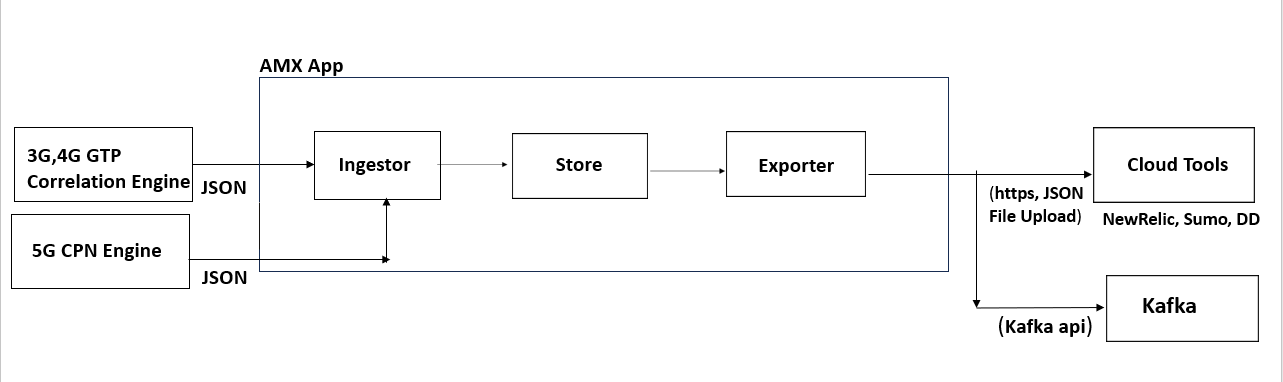
The AMX application can also export the 3G/4G control plane metadata received from the GTP Correlation engine and 5G control plane metadata received from the 5G CPN engine to the cloud tools and Kafka in Flat JSON format.
The AMX application can be deployed only on a GigaVUE V Series Node and can be connected to a GTP Correlation / 5G CPN engine running on a physical node.
Export GigaVUE Enriched Metadata for Mobile Networks and Export over HTTPS/Kafka
The metadata enrichment enhances service provider analytics, by generating metadata on 5G/4G/3G network traffic. The AMX correlates the user plane metadata produced by AMI with the control plane metadata produced by the GTP/5G correlation mobility application to produce an enriched metadata feed for the mobile networks. This data feed helps with use cases like service personalization, planning, and many others by containing information about the:
- Subscriber Session
- Over the Top Application
- Handset Type
- Location
- Flow throughput calculation attributes - DL, UL bytes, and time stamps.
- Application Protocol
- Core Network Information
- User Tunnel Information
Export of GigaVUE Enriched Metadata for Mobile Networks is supported only for GigaVUE V Series Node deployed using Third Party Orchestration on VMware ESXi.
User Plane and Control Plane traffic from the following devices are supported for exporting GigaVUE Enriched Metadata for Mobile Networks:
- GigaVUE-HC3
- GigaVUE-HC1-Plus
Note: For GigaVUE-HC1-Plus, the AMI application must be configured on the built-in engine to efficiently handle higher traffic loads. The plug-in engine can be used for the Control Plane traffic.
For information on Control Plane Metadata, refer to Control Plane Metadata.
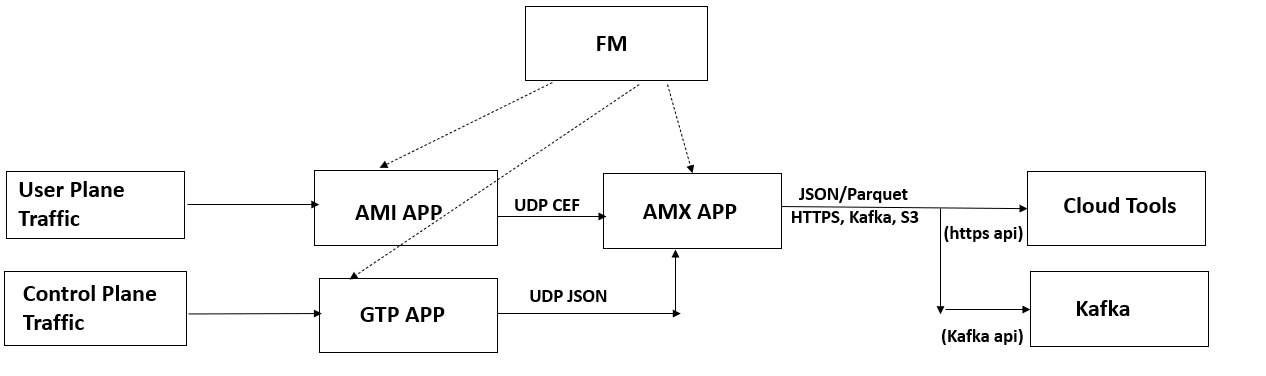
Export GigaVUE Enriched Metadata for Cloud Workloads and Export over HTTPS/Kafka
GigaVUE Enriched Metadata for Cloud Workloads provides comprehensive situational awareness to address security and performance pain points in a timely manner. It enriches application metadata from N/S and lateral traffic with key host environment details that allow you to find critical information as follows:
- The location of the workloads hosted and their virtual network.
- The operational environment to which the workloads belong.
- The instance types used, images, and tags that the workload contains.
- The host name, the security associations like security group name, IAM instance profile name.
Export of GigaVUE Enriched Metadata for Cloud Workloads (Virtual Machines)
Export of GigaVUE® Enriched Metadata (GEM) for Cloud Workloads is supported on the following cloud platforms:
- AWS
- Azure
- VMware (ESXi and NSX-T)
This functionality works by using the inventory API which is queried in the following intervals.
- VMware: 300 sec
- AWS: 30 sec
- Azure: 60 sec
The default inventory query interval should suffice in most cases, however the interval can be customized in extreme situations. Contact Gigamon Support for assistance.
In addition to these fixed inventory polling intervals, you can subscribe to optional services to receive automatic workload updatesin AWS (Event Bridge)/Azure (Event Grid). For VMware, no additional configuration is required because dynamic updates are enabled by default.
AMX application performs the enrichment every 10 seconds. It picks the flow records, which are 15 seconds or older, to allow any delays in fetching the inventory details, and uses the IP address of the endpoints to enrich the records based on the selected attributes. Refer to the following figure for a high-level illustration of the solution. The solution can be deployed using GigaVUE-FM or Third Party Orchestration.
The following image illustrates how AMX exports GigaVUE Enriched Metadata for cloud workloads by converting flow records into JSON/Parquet format and streaming them over HTTPS or Kafka to cloud tools.
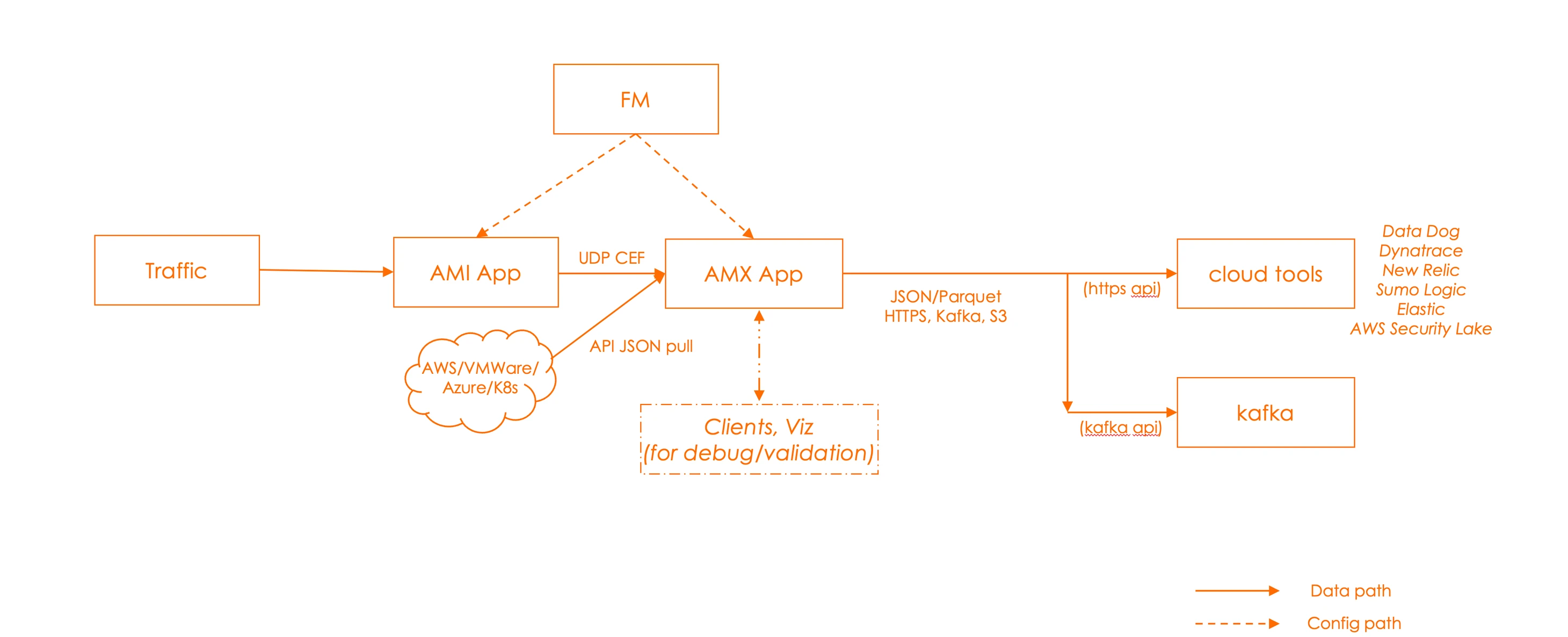
The enrichment supported depends on the type of platform. Refer to Attributes for GigaVUE Enriched Metadata for Cloud Workloads (Virtual Machines) for more details.
Export of GigaVUE Enriched Metadata for Cloud Workloads Kubernetes containers - Azure Kubernetes Service (AKS)
This feature enables the enrichment of flow records with Kubernetes inventory data, unlocking deeper visibility and advanced use cases for containerized environments. In the current Kubernetes visibility solution for AKS, UCT-TAP ships tapped traffic (both east-west and north-south) to the AMI node deployed in Azure. The AMI node then forwards metadata to the AMX node, also deployed in Azure. With the new enhancement, the AMX node enriches the AMI metadata using Kubernetes inventory details fetched directly from the AKS cluster.
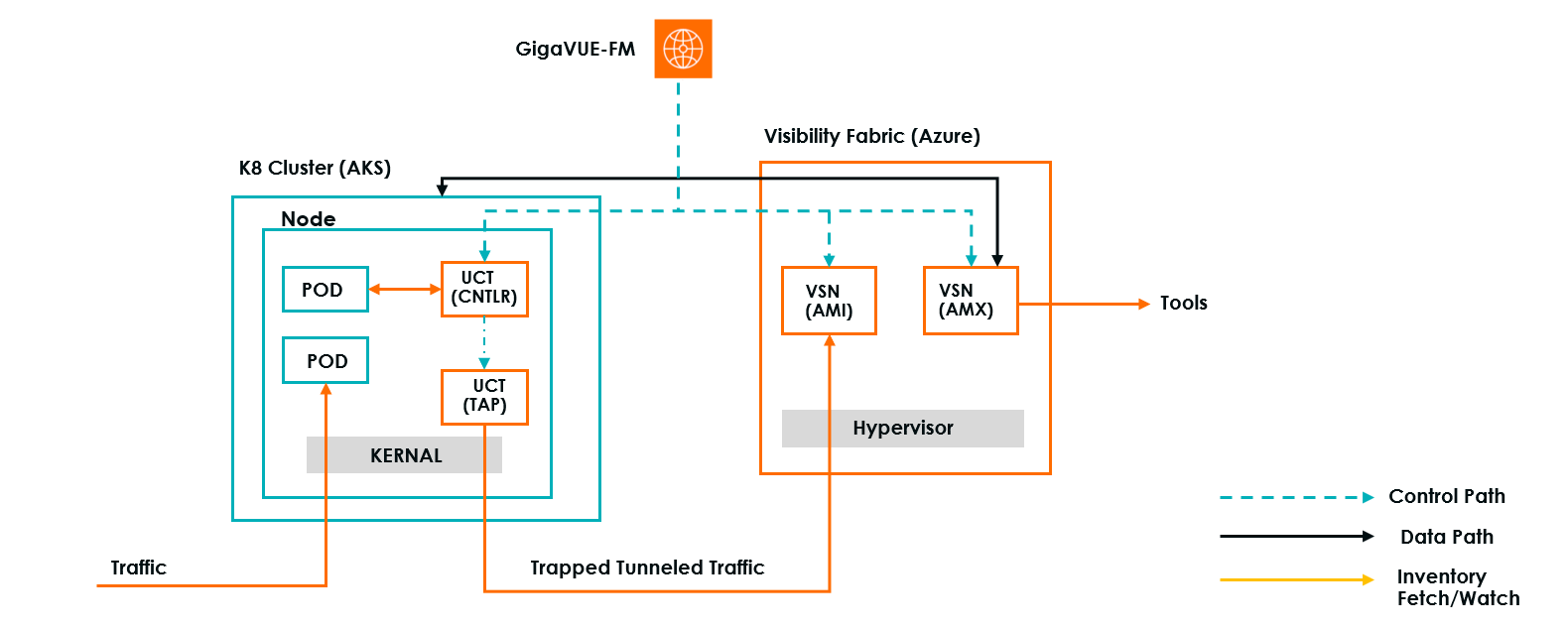
GigaVUE-FM queries the Kubernetes inventory every 300 seconds, which is the default interval for monitoring events between inventory fetches. The default inventory query interval should suffice in most cases; however the interval can be customized in extreme situations. Please contact Gigamon Support for assistance.
Note: In addition to sending regular queries every 300 seconds, GigaVUE‑FM enables a watch mechanism that updates AMX with every event—create, delete, and modify.
For Kubernetes environments, GigaVUE-FM uses a controller with access to the Kubernetes API. The controller subscribes to cluster events and pushes updates in near real-time. No built-in optional services are required. Refer to Prerequisites for Export of GigaVUE Enriched Metadata for Cloud Workloads for more detailed information.
The enrichment supported depends on the type of platform. Refer to Attributes for GigaVUE Enriched Metadata for Cloud Workloads Kubernetes containers - Azure Kubernetes Service (AKS) for more details.


