RADIUS
Note: The instructions given in the topic are based on ISE v3.3.x.
Only users belonging to the Super Admin User Group or users with write access to GigaVUE‑FM Security Management category can use the Authentication Server > RADIUS to add entries to GigaVUE‑FM’s list of available RADIUS authentication servers.
You can add multiple RADIUS servers. Servers are used as fallbacks in the same order they are specified – if the first server is unreachable, the second is tried, and so on, until all named servers have been used. If a server is reachable and authentication fails, the authentication process terminates.
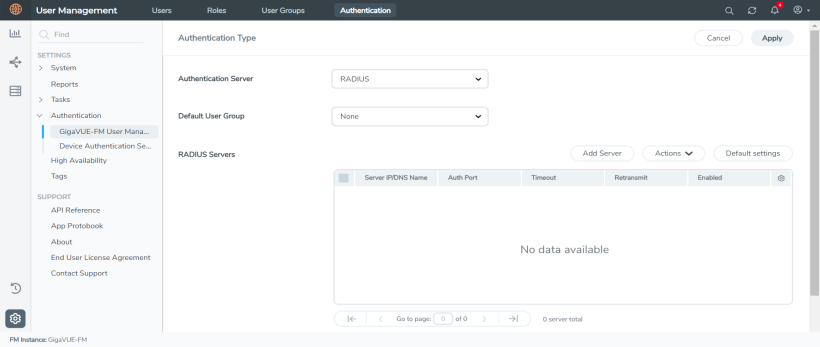
| 1 | Radius Server |
Note: If you are deploying GigaVUE‑FM inside AWS, make sure to provide the private IP address of GigaVUE‑FM to the Radius server for authentication and not its public IP address.
Supported RADIUS Servers
GigaVUE‑FM has been tested with the RADIUS implementation provided by Cisco Secure ACS v5.4.0.46.0 and CISCO ISE v3.3.x. Although other versions and implementations may operate acceptably, they have not been tested.
RADIUS Server Section: Controls and Fields
RADIUS Serverssection has the following buttons that allow you to manage the information that appears in the table.
|
Controls |
Description |
|
Add Server |
Allows you to add a new RADIUS Server to the list. See Add a New RADIUS Server for details. |
|
Actions |
Click the Actions drop-down to perform the following: Edit: Allows you to change the settings for an existing RADIUS Server entry. Select a server’s entry and click Edit to open a dialog where you make the changes. Delete: Allows you to delete a RADIUS Server entry. |
|
Default Settings |
Allows you to set default Shared Secret, Timeout, and Retransmit options for RADIUS Servers. When you add a new RADIUS Server to the list, you have the option of accepting these default settings or providing custom values. See Set Default Key, Timeout, and Retransmit Options for RADIUS Servers for details. |
Add a New RADIUS Server
You can add a new RADIUS Server to GigaVUE‑FM. Click the Add Server button and set the options shown in 2 Adding Radius Server.
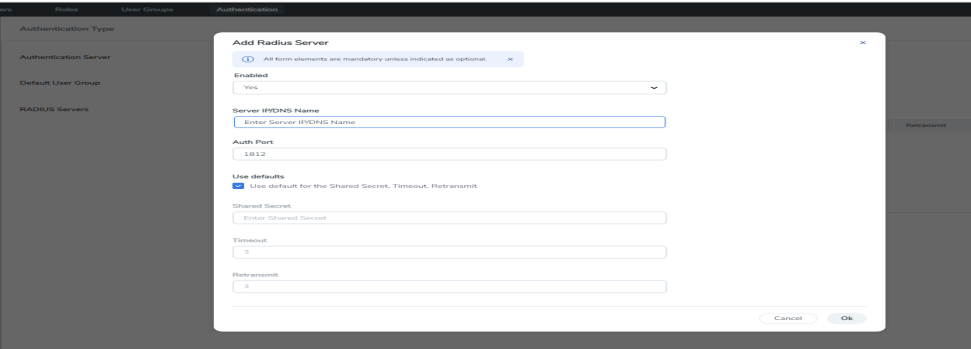
| 2 | Adding Radius Server |
Enter the following details in the Add Radius Server pop-up.
|
Setting |
Description |
|
Enabled |
Specifies whether this server is currently enabled for use with authentication requests |
|
Server IP/DNS Name |
Specifies the IPv4/IPv6 address or the DNS name of the RADIUS server. The same IPv4/IPv6 address can be used for more than one RADIUS server as long as they use different Auth Port values. |
|
Auth Port |
Specify the UDP port number on which the RADIUS server is running. If not specified, the port is set to the default RADIUS port number of 1812. |
|
Use defaults for following |
Leave this box checked to accept the default values for the Shared Secret, Timeout, and Retransmit options configured by clicking the Edit Default button at the top of the RADIUS page. Alternatively, you can leave this box unchecked and set custom values for the Shared Secret, Timeout, and Retransmit options using the respective fields. |
|
Shared Secret |
Specifies a shared secret string to be used for encryption of authentication packets sent between GigaVUE‑FM and this RADIUS server. |
|
Timeout |
Specifies how long GigaVUE‑FM will wait for a response from this RADIUS server to an authentication request before declaring a timeout failure. The valid range is 0-60 seconds; default value is five seconds. |
|
Retransmit |
Specifies the number of times GigaVUE‑FM will attempt to authenticate with this RADIUS server before moving on to the next authentication server or method. The valid range is 0-5; default is two. Set to 0 to disable retransmissions. |
Set Default Key, Timeout, and Retransmit Options for RADIUS Servers
Click Default Settings to edit the following options:
The following table describes the settings.
|
Setting |
Description |
|
Shared Secret |
Specifies a default shared secret string to be used for encryption of authentication packets sent between GigaVUE‑FM and all RADIUS servers. Can be overridden with the key specified for a specific RADIUS Server when the server is added. |
|
Timeout |
Specifies a default value for how long GigaVUE‑FM should wait for a response from a RADIUS server to an authentication request before declaring a timeout failure. This can be overridden with the timeout value specified for a specific RADIUS Server when the server is added. The valid range is 0-60 seconds. The default value is five seconds. |
|
Retransmit |
Specifies a default value for the number of times GigaVUE‑FM will attempt to authenticate with a RADIUS server. Can be overridden with the retransmit value specified for a specific RADIUS Server when the server is added. The valid range is 0-5; default is two. Set to 0 to disable retransmissions. |


