Enhanced Load Balancing
Enhanced Load Balancing redistributes the traffic from a failed endpoint to another endpoint which is a part of the ELB group. When the failed endpoint recovers, the redistributed traffic is restored to the recovered endpoint. The traffic across other endpoints remain undisturbed during this process. Hashing is performed on the packets based on outer and/or inner headers.
To enable to enhanced load balancing application:
- Create an Enhanced Load Balancing Profile.
- In the Monitoring domain page, click Settings, then click Enhanced Load Balancing
- Click New and then create a profile.
Fields
Values
Hash fields
The various hash options are
ip
ip-src
ip-dst
l4-port
l4-portsrc
l4-portdst
gtputeid
Position
Select either inner/outer location of the hash field to be matched with the incoming packet..
Hash-mask
When the hash-fields ip-src/ip-dst are defined along with the IP, then ip-src/ip-dst hash-mask will overwrite the IP hash mask. For load balancing, you must apply this mask before hashing the IP.
The default options and their default values are:
IPv4 : 255.255.255.255
IPv6 :FFFF:FFFF:FFFF:FFFF:FFFF:FFFF:FFFF:FFFF
- Go to monitoring session page and
- Drag and drop Load Balancing from APPLICATIONS to the graphical workspace.
- Click the load balancing application and select Details. The Application quick view appears.
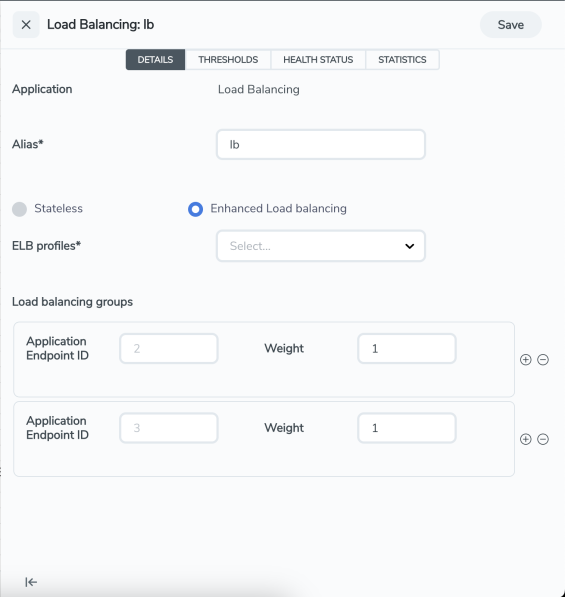
- In the Application quick view, enter the information as follows:
Metric
Description
Alias
Enter a name for the load balancing application Enhanced Load Balancing
Select this option to enable Enhanced Load Balancing and select the ELB profile.
Load balancing groups Add or remove an application with the Endpoint ID and Weight value (1-100). A load balancing group can have minimum of two endpoints.
- Click Save.
Note: When you configure the Load Balancing Application in enhanced mode, you can associate it with only a single enhanced load balancing profile. However, you have the flexibility of changing the association to different profile as needed.


