Connecting -48V DC Power Supply Modules
This section provides instructions for connecting a 48V DC input to the screw terminal on the DC power supply module.
To connect a -48V DC input to the screw terminal on the DC power supply module:
|
1
|
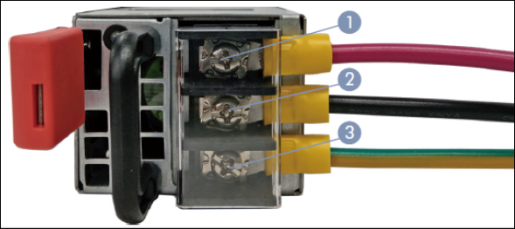
Connecting -48V DC input to the screw terminal on the DC power supply module |
|
1.
|
Connect the ground terminal (yellow-green wire, labeled as 3) of the power supply module to an earth ground connection. Hardware specifications for ground connection are listed below: |
|
b.
|
Recommended Lug: Use the lug included in the accessory kit or equivalent accommodates maximum 10 AWG wire. |
|
c.
|
Tightening Torque: Tighten the screw to a torque of 13 in-lbs. |
|
d.
|
For spare DC power cable, refer to Edgecore part number 120500000976A. |
|
2.
|
Use a Phillips screwdriver to connect the -36V to -72V DC power cable (black wire, labeled as 2) and the RTN (Return) power cable (red wire, labeled as 1) to the screw terminals.
Hardware specifications for power cables are listed below: |
|
b.
|
Recommended Lug: Use the lug included in the accessory kit or equivalent accommodates maximum 10 AWG wire. |
|
c.
|
Tightening Torque: Tighten the screw to a torque of 13 in-lbs. |
|
d.
|
For spare DC power cable, refer to Edgecore part number 120500000976A. |
Caution: Use a UL/IEC/EN 60950-1 certified power supply to connect to a DC converter, and a #10 AWG (for - 36 VDC to -72 VDC PSU) wire to connect to a DC PSU.
Attention: Utilisez une alimentation certifiée UL/IEC/EN 60950-1 pour le connecter à un convertisseur CC et un câble AWG #10 (pour -36 VDC à -72 VDC) pour vous connecter à une alimentation CC.
|
3.
|
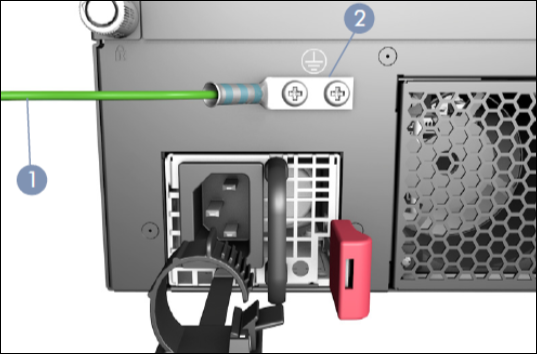
Connect the chassis protective ground to the designated ground point on the left-hand side (facing the rear of the GigaVUE‑TA200E). Hardware specifications for chassis grounding are listed below: |
|
a.
|
Screw Size: Use two M5 screws to secure the protective ground. |
|
b.
|
Tightening Torque: Tighten each screw to a torque of 10.4 in-lbs. |
|
c.
|
Unpainted Surface Area: Ensure that the area around the grounding point is unpainted. Recommend using the grounding lug (included) with 10 AWG grounding wire (not included). |
|
d.
|
For spare lugs, refer to Edgecore part number 151200000452A for DC power chassis accessory kit. |
|
2
|
Connecting chassis protective ground to the designated ground point |


