Entrust nShield and Thales- Luna HSM for TLS/SSL Decryption for iSSL
This feature enables inline TLS/SSL decryption to work with Hardware Security Modules (HSMs), enhancing the security and flexibility of cryptographic operations. HSM's are designed to:
|
■
|
Securely perform cryptographic processing. |
|
■
|
Generate and store cryptographic keys. |
|
■
|
Prevent unauthorized access to sensitive data. |
ISSL with Entrust nShield/Thales- Luna HSM
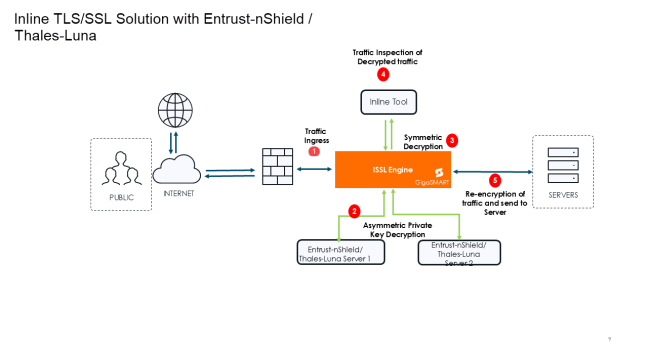
The following steps describe the end-to-end flow:
|
1.
|
Traffic Ingress-Traffic enters the system through the Inline Network Port (Ingress). This port acts as the first point of entry for all inbound encrypted traffic. |
|
2.
|
Asymmetric Decryption- TLS handshake traffic which needs private key operation directs to HSM server. |
|
3.
|
Symmetric Decryption- Post private key operation done on HSM, data traffic decrypts in GigaSMART. |
|
4.
|
Traffic Inspection- The decrypted traffic is forwarded to inline security tools . These tools inspect but do not modify packet contents. Tools may allow, alert on, or block traffic based on inspection results, but they do not change the actual data. |
|
5.
|
SSL Re-encryption and sent to Server -The GigaSMART engine re-encrypts the traffic using the TLS/SSL parameters. The re-encrypted traffic is sent out to the servers. |
HSM - Supported Solutions
Inline TLS/SSL decryption supports the following HSM solutions:
|
■
|
Thales Luna Network HSM |
HSM Configuration Rules, Notes, and Limitations
|
■
|
Network & Deployment Requirements |
|
o
|
Use a static IP address for the GigaSMART engine, and ensure it is registered on the HSM server. |
|
o
|
DHCP is not recommended. If the IP address changes, the entire HSM setup must be deleted and reconfigured. |
|
o
|
IPv6 is not supported for Thales Luna HSM server configuration when IPv6 stack port support is enabled. IPv6 traffic can be decrypted but HSM server IP and GigaSMART engine IP configuration will not support IPv6 address. |
|
o
|
A deployment can use only one HSM type—either Entrust nShield or Thales Luna. |
|
o
|
Entrust nShield and Thales Luna HSM cannot operate together within the same HSM Group or the same GigaVUE HC Series device. |
|
■
|
Switching Between HSM and Non-HSM Configurations: When moving from non-HSM to HSM, or between different HSM types, the GigaSMART engines and the device must be restarted before redeployment. |
|
■
|
Keys, Keychain, and Certificates |
|
o
|
The Keychain password must be set before importing any keys. If not set, key and certificate uploads will fail. |
|
o
|
Key–certificate mismatch checks cannot be performed for RSA or ECDSA keys because private keys remain on the HSM server. |
|
o
|
For inbound deployments, required CA certificates must be uploaded to trust store avoid configuration errors. |
|
o
|
For outbound deployments, CA certificates are optional but recommended for improved validation. |
|
■
|
Unsupported Deployment Combinations |
|
o
|
Mixed HSM types (Entrust nShield + Thales Luna) are not supported, even if configured on different Gen3 GigaSMART cards. |
|
o
|
Mixed HSM and non-HSM deployments cannot exist on the same device, including across separate Gen3 cards. |
|
o
|
Mixed generation configurations are not supported: |
|
o
|
Gen2 non-HSM iSSL cannot be configured with Gen3 HSM iSSL, even on different cards within the same device. |
|
■
|
Thales Luna-Specific Limitations |
|
o
|
Thales Luna Network HSM does not support cluster, standby, or non-HA modes. |


