Internet Content Adaptation Protocol (ICAP)
The Internet Content Adaptation Protocol (ICAP) is used to connect inline deployments with external security services, such as Data Loss Prevention (DLP) systems. It provides a standard way to send decrypted HTTP traffic to a DLP-ICAP server for inspection and policy enforcement.
In Gigamon deployments, the ICAP Client runs inside the GigaSMART® engine, where it acts like an inline tool. It receives decrypted HTTP traffic and forwards it to the ICAP server. The server inspects the content, applies any security policies, and returns the results. The ICAP Client then reinserts the inspected traffic back into the inline path.
Note: The ICAP Client is included as part of the TLS/SSL license SKUs.
How ICAP Solution works
In an Inline SSL/TLS Decryption (iSSL) workflow, decrypted HTTP requests and responses can be sent directly from GigaSMART to the ICAP Client. The ICAP Client then:
| Sends the decrypted traffic to the ICAP server for analysis. |
| Accepts and applies any changes from the ICAP server before passing the traffic downstream. |
| Works in both inbound and outbound inline traffic chains. |
This process allows DLP systems to examine live, decrypted traffic in real time without breaking the inline flow.
Originally, DLP-ICAP servers had to be placed outside of the Gigamon decryption zone, which limited their ability to enforce policies on live traffic. With the ICAP Client, integration now happens directly in the inline path, providing real-time DLP enforcement.
The ICAP Client can also operate independent of Inline SSL , as long as it receives HTTP traffic (clear text) from another source.
The following figures illustrate typical Inbound and Outbound deployment scenarios where the ICAP Client is used to support DLP inspection.
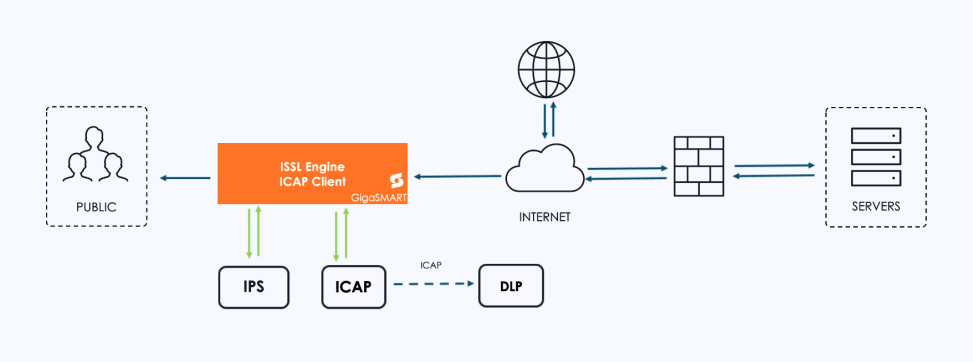
| 1 | Inline SSL Solution with ICAP Client support – Outbound Deployment |
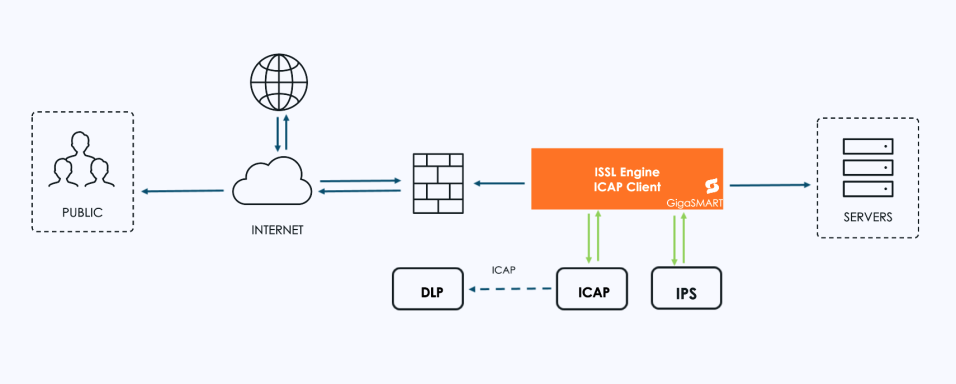
| 2 | Inline SSL Solution with ICAP Client support – Inbound Deployment |
ICAP - Supported Platforms
ICAP Client app is supported in the following platforms and cards:
|
Platform |
Card |
|
GigaVUE-HC1 Gen3 |
SMT-HC1-S |
|
GigaVUE-HC1P Gen3 |
SMT-HC1-S , SMT-HC1A-R |
|
GigaVUE-HC3 Gen3 |
SMT-HC3-C08 |
ICAP - Rules, Notes, and Limitations
| 1. | GSOP Integration Rules |
| The ICAP GSOP must run as a standalone operation. It cannot be chained with other GSOPs. |
| Each GSGroup can include only one ICAP GSOP. |
| ICAP is not supported in clustered environments. |
| 2. | Protocol and Traffic Handling |
| HTTP/2 traffic is not supported. HTTP/2 shall be downgraded to HTTP1.1 if required via a configuration option, so that ICAP inspection shall be done. |
| HTTP/1.1 pipe lining is not supported; only one HTTP request/response can be processed at a time. |
| HTTP chunk extensions are not forwarded to the ICAP server. |
| HTTP trailers are forwarded as-is, but trailers within the preview length are not sent, per RFC 3507 limitations. |
| Any Trailer present in HTTP messages are forwarded to the ICAP server without any modification, as the ICAP RFC does not define specific behavior for HTTP trailers. |
| 3. | Engine Port and Traffic Flow Considerations |
| Using multiple engine ports in an inline pair map can disrupt traffic due to asymmetric flow. For example, a SYN packet from side A may hit engine port 1 while the SYN/ACK reply from side B reaches engine port 2, causing flow inconsistency. |
ICAP - Supported GigaSMART Engine Ports
Refer to the table below for information on the number of GigaSMART engine ports required for each deployment module:
|
Type |
Number of GS Engine |
Comments |
|---|---|---|
|
Standalone |
1 |
1 Gen3 for ICAP |
|
Inline SSL: Same Node |
2 |
1 Gen3 for ICAP and 1 Gen3 or Gen2 for iSSL Inline SSL does not support HTTP2 Downgrade on Gen2. If HTTP2 Downgrade is required for iSSL, use 1 Gen3 for ICAP and 1 Gen3 for iSSL. |
|
Inline SSL: Different Node |
2 |
1 Gen3 for ICAP in the same node and 1 Gen3/Gen2 for ISSL in the other node |


