Inline TLS/SSL Decryption Solution with Layer 3 Tools (NAT-PAT)
A Layer 3 inline SSL decryption refers to Gigamon’s deployment of its inline TLS/SSL decryption solution at the network layer (Layer 3 of the OSI model). In this mode, the GigaVUE node intercepts encrypted traffic flows between clients and servers, decrypts the SSL/TLS traffic, and subsequently delivers the decrypted packets to security tools for inspection. After the inspection, the traffic is re-encrypted and forwarded to its destination. Here are some key aspects of the solution:
| Traffic Routing: The solution allows for the configuration of subnet-based IP ranges at the ISSL profile level. This configuration determines whether traffic is routed through L3 tools. For example, traffic within a specific subnet range can be designated for L3 tools, which support NAT-PAT (Network Address Translation - Port Address Translation) for correlating client, server, and tool sessions. |
| Deployment Modes: The solution can be deployed in a one-arm mode, which is suitable for enterprises looking to optimize their return on investment (ROI) by aligning with the capabilities of their inline tools. |
| Configuration and Management: The deployment involves configuring flow maps to guide decrypted traffic to the appropriate tools, such as Next-Generation Firewalls (NGFWs). This includes setting up inline network bundles, flex maps, and inline SSL profiles. |
| Monitoring and Statistics: The solution provides tools for monitoring traffic states, session statistics, and certificate hit counts. This helps in managing and optimizing the decryption process. |
Architecture of an L3 Tool based Inline TLS/SSL Decryption Solution
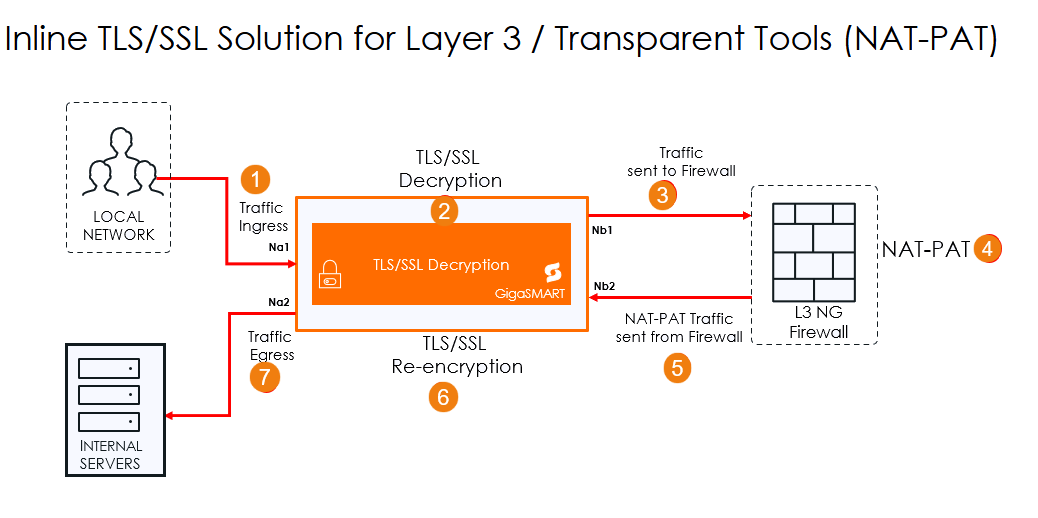
The following steps describe the end-to-end flow:
| 1. | Traffic Ingress-Traffic enters the system through the Inline Network Port (Ingress). This port acts as the first point of entry for all inbound encrypted traffic. |
| 2. | TLS/SSL Decryption-The traffic is directed to the GigaSMART engine, where the inline TLS/SSL application is. The engine decrypts the TLS/SSL traffic. |
| 3. | Traffic Sent to Firewall-The decrypted traffic is forwarded to the firewall. |
| 4. | NAT-PAT- The traffic is now either Network Address translated or Port Address translated. |
| 5. | Traffic Sent from Firewall :Traffic is being forwarded to the GigaSMART engine for re-encryption. |
| 6. | SSL Re-encryption-The GigaSMART engine re-encrypts the traffic using the TLS/SSL parameters. |
| 7. | Traffic Egress-The re-encrypted traffic is sent out through the Inline Network Port (Egress) to continue to the servers. |
Rules and Notes
The following table lists rules and notes that you need to be aware of while configuring your deployment.
|
Rule / Feature |
Details / Limitations |
|---|---|
|
Exclusive Use |
Inline tools in a flexible inline map cannot be used in classic inline or inline decryption maps. All inline networks and tools must belong to only one type of map. |
|
Collector Maps |
Only one unidirectional collector map is allowed for the same inline network. To use different VLANs in each direction, create separate unidirectional maps with unique VLAN tags. Tags can be set manually or assigned automatically by GigaVUE-FM. |
|
Unsupported Features ( GigaVUE‑TA200, GigaVUE‑TA200E, GigaVUE‑TA25E, GigaVUE‑TA25, GigaVUE‑TA400, GigaVUE-TA400E) |
- Physical Bypass (no BPS card) |
|
VLAN Tagging and OOB Copy Limits ( GigaVUE‑TA25, GigaVUE‑TA25E, GigaVUE‑HC1-Plus) |
Flexible Inline Single VLAN Tag with monitoring mode may send incorrect VLAN tags. OOB copy packets may also have wrong tags. You cannot use BYPASS WITH MONITORING with MONITORING mode on the tool. OOB copy from inline network is not allowed in this mode. |
|
Inline Map Limits — Bidirectional |
GigaVUE‑TA25,GigaVUE‑TA25E, GigaVUE‑HC1-Plus → 126 maps GigaVUE‑HC1,GigaVUE‑HC3 (CCv1 & CCv2), GigaVUE‑TA200, GigaVUE‑TA200E, GigaVUE‑TA400, GigaVUE-TA400E → 256 or 512 maps depending on setup. |
|
Inline Map Limits — Unidirectional |
GigaVUE‑TA25,GigaVUE‑TA25E, GigaVUE‑HC1-Plus→ 252 mapsGigaVUE‑HC1,GigaVUE‑HC3 (CCv1 & CCv2), ), GigaVUE‑TA200, GigaVUE‑TA200E, GigaVUE‑TA400, GigaVUE-TA400E → 512 or 1024 maps depending on setup. |
|
Flexible Inline SSL Limits |
Not supported with Inline Network LAG. Setting inline tools to “Drop” in the chain does not block Inline SSL traffic. |
|
Filtering Limits( GigaVUE‑TA400, GigaVUE-TA400E) |
VLAN-based filtering in the Egress Port Filter for OOB copies is not supported. If one tool in the map is in monitoring mode, all tools must use the same mode. Asymmetric hashing (a-srcip-b-dstip and b-srcip-a-dstip) is not supported. |
|
Protocol Pass-Through( GigaVUE‑TA400, GigaVUE-TA400E) |
CDP pass-through is not supported when the source is an Inline Network LAG. Bypass for LACP, CDP, and LLDP is supported. |
|
Scaling Limits — GigaVUE‑TA400, GigaVUE-TA400E |
Max Inline Networks and Tools: 48 Max Inline Network LAG list: 24 Max Inline tools or tool groups per direction: 16 Max OOB copy entries per direction: 17 Max OOB copy ports per entry: 128 |


