Inline TLS/SSL Decryption Solution with ICAP Client
ICAP (Internet Content Adaptation Protocol) is used to inspect and modify HTTP messages by offloading them to a separate server. It allows clients to send HTTP requests and responses to an ICAP server, which can process the content and return a modified response. The message format follows HTTP/1.1, with components like the request line, headers, and body.
In a standard Inline SSL setup, the GigaVUE node decrypts SSL traffic and forwards it to an inline tool for processing. However, this setup does not support integration with DLP (Data Loss Prevention) servers running over ICAP.
By combining Inline SSL with ICAP, the decrypted traffic can now be routed through an ICAP client within the GigaSMART application. This enhancement enables direct integration with DLP ICAP servers, allowing advanced inspection and policy enforcement on decrypted content.
The following image provides an end -to end flow of Inline TLS/SSL Configuration with an ICAP Client
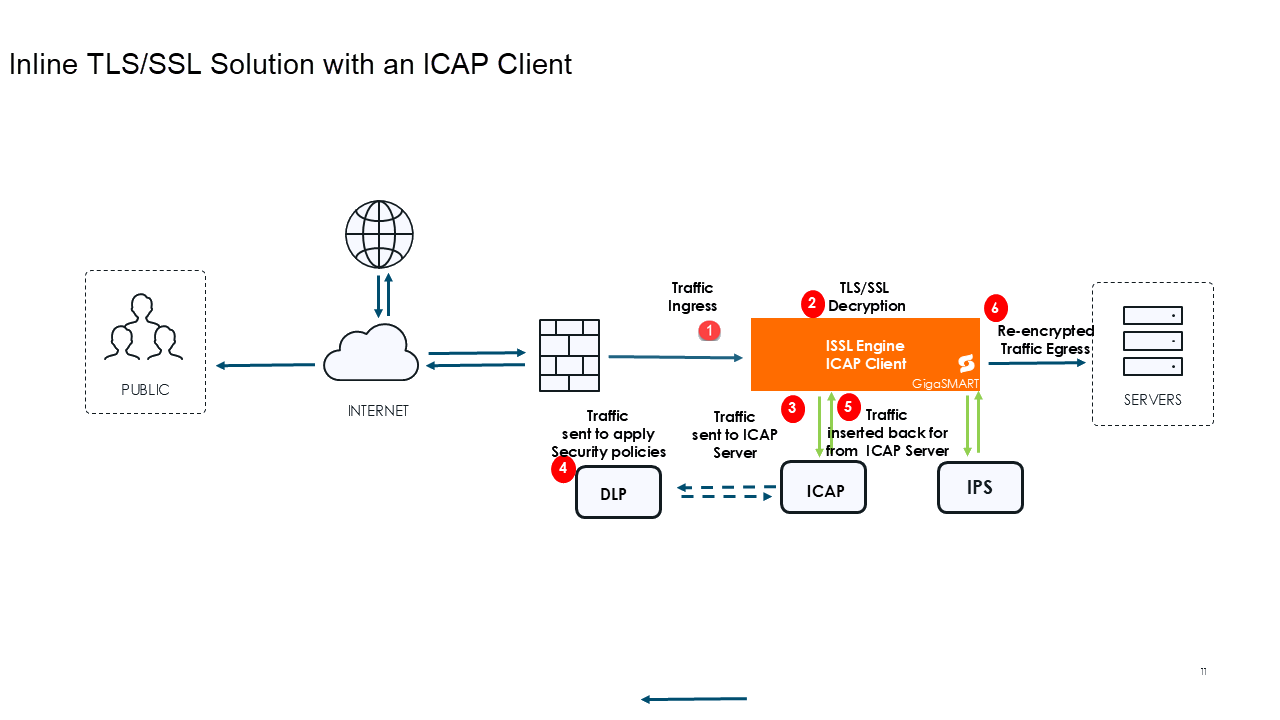
The following steps describe the end-to-end flow:
|
1.
|
Traffic Ingress-Traffic enters the system through the Inline Network Port (Ingress). This port acts as the first point of entry for all inbound encrypted traffic. |
|
2.
|
TLS/SSL Decryption-The traffic is directed to the GigaSMART engine, where the inline TLS/SSL application is. The engine decrypts the TLS/SSL traffic, making it readable for inspection tools. |
|
3.
|
Traffci sent to ICAP Client- the decrypted traffic can now be routed through an ICAP client within the GigaSMART application. |
|
4.
|
Traffic Inspection- The traffic is now directed to DLP ICAP servers, allowing advanced inspection and policy enforcement on decrypted content. |
|
5.
|
Traffic sent back for re-encryption - The traffic is now sent from ICAP server to the GigaSMART engine. |
|
6.
|
SSL Re-encryption and sent to Server - The re-encrypted traffic is sent out to the servers. |
ICAP - Limitations
|
■
|
The ICAP Client cannot be deployed inline with the following iSSL configurations: |
|
■
|
In GigaVUE‑HC1-Plus, the inline network ports must reside in the same hardware slot.Ther |
|
■
|
ICAP is not supported in GigaVUE-HCT chassis. |
Refer to Configure ICAP Client and Configure ICAP Client for Inline TLS/SSL Decryption Solution for configuration details.


