Attributes of Inline TLS/SSL Decryption Solution
This section describes the various attributes that construct an inline TLS/SSL decryption solution. You can configure these attributes in the Inline SSL App based on your deployment type. For details, refer to Configure Flexible Inline TLS/SSL Decryption Solution.
Refer to the following sections for more details:
TLS/SSL Sessions
Secure Sockets Layer (SSL) is a protocol that enables secure data transfer between a client and server. Transport Layer Security (TLS) builds on SSL and adds stronger cryptographic protection for TCP/IP communication.
A TLS/SSL session begins when the client initiates a connection. The GigaVUE node intercepts this request and negotiates a TLS/SSL session with the client. The node monitors all TCP connections and intercepts TLS/SSL sessions, while non-TCP traffic passes through unchanged.
All incoming TLS/SSL traffic terminates on the GigaVUE node. The node decrypts traffic for inbound or outbound deployments, forwards it to inline tools, and then passes it to the server.
The GigaVUE node maintains session details such as the client’s IP address, allowing it to “reconnect” the client and server after decryption. The node also negotiates a new TLS/SSL session with the server. TLS/SSL traffic can be sent to tools inline or out-of-band.
TLS/SSL Handshake
TLS/SSL encryption secures traffic between client and server. Decryption uses keys to decode this traffic. TLS/SSL protocols define a series of handshake messages that set up and tear down a secure connection.
During the handshake, the client and server use Public Key Infrastructure (PKI) to exchange encryption keys for data transfer.
TLS/SSL Handshake Steps:
1. The client sends a Client Hello message with its supported TLS/SSL version, cipher suites, and a random number.
2. The server replies with a Server Hello message. It selects a cipher suite, sends its supported version, a random number, and its digital certificate.
3. The client verifies the server’s certificate.
4. Using the random numbers, the client creates a pre_master_secret, encrypts it with the server’s public key, and sends it.
5. The server verifies the client certificate if requested.
6. The client sends a Client Finished message, encrypted with the shared secret key, confirming its part of the handshake.
7. The server responds with a Server Finished message, also encrypted, confirming its part of the handshake.
8. The session is now established, and both sides use the shared secret key for encrypted communication.
TCP Transition States during TLS/SSL Session
The TCP handshake moves through different states during a TLS/SSL session:
| (Na:SYN RCV:Nb:SYN_SENT:INIT:INIT): Client SYN received; TCP handshake starts on the server side. If the server is busy or unreachable, the session resets. |
| (Nb:SYN_RCV: EST:INIT:INIT): TCP handshake is complete on the server side. |
| (Na:EST:Nb:EST:Na:INIT:Nb:INIT): TCP handshake complete between client and server; session may be decrypted depending on policy. |
| (Na:EST:Nb:EST:Ta:SYN_SENT:Tb:INIT): Decryption decision made; tool-side TCP handshake begins. |
| (EST:EST:Ta:SYN_SENT:Tb:SYN_RCV): Tool-side TCP handshake continues. |
| (EST:EST:EST:EST): TCP handshake successfully established |
TLS/SSL Session Resumption
TLS/SSL sessions can be resumed to improve performance. TLS/SSL session resumption speeds up the TLS/SSL handshake.
Once a session has been established, the keys are saved so a session can be resumed efficiently later. The resumed TLS/SSL handshake has fewer steps.
Session identifier-based resumption is supported. The GigaVUE node maintains the session identifier data in the cache. Session ticket-based resumption is not supported. By default, resumption is enabled.
TLS/SSL Session Search
You can search for an existing TLS/SSL session by hostname. The system matches the input against the Server Name Indication (SNI) or the certificate subject name of current sessions.
StartTLS and HTTP CONNECT
When the system detects a CLIENT HELLO packet, it switches to TLS/SSL mode.
| StartTLS: Allows protocols like SMTP, IMAP, and POP3 to begin in plaintext, then upgrade to TLS/SSL on the same port. Up to 20 ports can be monitored for StartTLS traffic. |
| HTTP CONNECT: Used by explicit proxies to establish an HTTP session, then upgrade to TLS. Detection is automatic. |
Both methods add security by upgrading existing plain text protocols.
Behavior with StartTLS
| If StartTLS is used, Inline TLS/SSL decryption works if the decision to decrypt is made at the certificate phase. |
| If the CLIENT HELLO packet does not have SNI, policy rules are applied during the certificate phase. |
Explicit proxy traffic also applies policy rules during the certificate phase.
Note: StartTLS must be enabled for decryption of sessions that use explicit proxy.
TLS/SSL Keys and Certificates
The TLS/SSL protocol enables secure data transfer between a server and a client. Both ends use cryptographic keys to decode the transmission and certificates to establish trust.
A TLS/SSL certificate is a digital file that contains a public key, host information, and a digital signature from a Certificate Authority (CA). This certificate ensures that communication between two endpoints can be trusted.
The Inline TLS/SSL decryption solution acts as a Break-and-Inspect system.
| Outbound traffic – The Man-in-the-Middle (MitM) generates server certificates on the fly, signed by the installed Signing CA. |
| Inbound traffic – Certificate generation is not required, but the server’s private key and certificate chain must be provided to the MitM. |
The inline TLS/SSL decryption solution uses two main components – Key Store and Trust Store.
Key Store
The key store holds private keys and certificate-key pairs. It can store up to 1000 key pairs. Keys can be used for:
| Inbound deployment – For decrypting traffic using the server’s private key. |
| Outbound deployment – For re-signing and re-encrypting traffic using the Signing CA. |
The key store supports encrypted or password-protected PEM files to fetch or download private keys. It also supports ECDSA keys for both inbound and outbound deployments.
Trust Store
The trust store is used to validate server certificates. Gigamon only trusts certificates that are linked to a CA in the trust store. In other words, the certificate chain must connect back to one of the trusted root CAs.
Gigamon provides a default trust store, based on Mozilla’s trusted CAs, which is updated periodically. You can replace it with your own trust store in PEM format, append new CA certificates, or delete specific ones. You can also search for a certificate using its SHA1 fingerprint.
Note: Whenever you modify the trust store, you must reconfigure the inline TLS/SSL profile for the changes to take effect.
Certificate Validation
Gigamon validates server certificates before re-signing them. This prevents untrusted certificates from being incorrectly accepted. The validation process includes:
| Certificate expiration date and validity period – The certificate must not be expired and must fall within the valid date range. |
| Certificate issued by trusted CA – The GigaVUE node maintains a list of trusted root CAs. This list determines the certificates that the client will accept. The trust store acts as a trust anchor during certificate validation. The GigaVUE node validates that each incoming certificate chain is trusted by one of the certificates in the trust store. |
| Server name – The hostname in the certificate must match the Server Name Indication (SNI). If the client does not send SNI, this check is skipped. |
| Certificate revocation check – The system checks the certificate’s status using OCSP or CRL. This requires internet access. The certificate revocation check determines the revocation status of the server certificate. |
Certificates that pass validation are signed by the primary MitM CA. If a certificate fails validation but a security exception is configured, the secondary MitM CA signs the certificate instead.
If the certificate is self-signed, the re-signed certificate will also be self-signed. Typically, client applications only trust the primary MitM CA, which helps surface certificate errors to end users so they can decide whether to reject the connection.
If no exception is configured, connections with invalid certificates are dropped.
Types of Certificate Validation Errors
The types of Certificate Validation errors are as follows:
| Expired – The certificate validity period has ended. |
| Self-signed – The certificate issuer and subject are the same. |
| Unknown CA – The CA is not in the trust store or cannot be validated. (You may download and import the root certificate if you trust the site.) |
| Invalid – The certificate does not match the SNI or contains incorrect signature/field information. |
For expired, unknown CA, and invalid certificates, Gigamon re-signs the certificate with the secondary MitM CA. This allows users to either accept or reject the connection.
Client Authentication
A server can request a client certificate after sending the Server Hello message. The client responds with its certificate, and the server validates it. Gigamon supports client authentication for both inbound and outbound traffic. If client authentication is detected during the handshake, the connection is bypassed.
Re-Signed Certificates
As a Man-in-the-Middle (MitM), Gigamon re-signs certificates.
| Fields copied from original certificate: |
| subject name |
| certificate validity |
| subject alternative name |
| Fields removed from the certificate: |
| authority information access |
| certificate policies |
| CRL distribution points |
| SCT list |
| Fields set in the re-signed certificate: |
| certificate type - v3 |
| issuer |
| version |
| public key |
| random serial number |
| signature algorithm/hash |
| thumbprint |
| v3 extensions: |
| • | basicConstraints CA—True |
Note: As this is a CA certificate, basicConstraints is set to True. For leaf certificates, basicConstraints is set to False.
| • | keyUsage—digitalSignature and keyEncipherment |
| • | extendedkeyUsage—serverAuth |
| • | subjectKeyIdentifier—hash |
| • | authorityKeyIdentifier—keyid,issuer:always |
Certificate Revocation Status
When Gigamon re-issues certificates for outbound traffic, clients automatically trust them because the MitM CA is already installed in the browser’s trust store. This prevents clients from directly checking the revocation status of the original certificate.
Instead, the GigaVUE node performs revocation checks before generating replacement certificates.
| Soft fail mode – Traffic continues even if the revocation status is unknown. |
| Hard fail mode – Traffic is blocked until the certificate’s revocation status is confirmed. |
If a certificate is confirmed as revoked, all future TLS/SSL connections to that server are dropped. By default, revocation checks are disabled.
Methods to Check Certificate Revocation Status
To check the certificate revocation status utilize one of the following method:
| Certificate Revocation List (CRL) – An online database of revoked certificates published by each CA. The list contains the serial number of the revoked certificates and the reasons for the revocation. Any revoked certificate should not be trusted even if the signatures are valid. The CRL location is included in the “CRL distribution points” X.509 extension of the certificate. |
| Online Certificate Status Protocol (OCSP) – An Internet protocol used for obtaining the revocation status of an X.509 certificate. A real-time check can be performed using the OCSP link in the “Authority Information Access” X.509 extension. |
If both CRL and OCSP are enabled, OCSP is attempted first, followed by CRL. Both methods require internet connectivity.
Policy Profile
A Policy Profile defines how traffic is processed during Inline SSL/TLS decryption. It determines which traffic is decrypted and which remains encrypted, based on a set of match rules and handling options. Each rule includes a match condition and an action—either decrypt or no-decrypt. For example, administrators can decrypt all general traffic while excluding sensitive categories such as financial transactions.
A Policy Profile is made up of several components:
| Policy Rules: Match traffic conditions and apply either decrypt or no-decrypt actions. |
| Default Action: Specifies the action taken when no rule matches. |
| URL Cache Miss Action: Defines what to do when a rule based on URL category cannot be evaluated because category data is missing. |
| Certificate Handling: Controls how certificates are validated for decrypted traffic. Administrators can allow or block expired, invalid, self-signed, or unknown-CA certificates and enable or disable certificate-revocation checks. |
| Tool Handling: Determines whether decrypted or non-decrypted traffic is forwarded to inline tools for further analysis. |
Types of Policy Rules
Policy rules can be created based on one or more attributes such as:
| URL category (for example, finance, healthcare, or social media) |
| Hostname or domain name |
| Server certificate issuer |
| Source or destination IP address |
| Source or destination port number |
| VLAN identifier |
Scale and Flexibility
A single policy profile can include up to 2,048 rules, allowing fine-grained control over decryption policies and precise traffic handling across complex network environments.
Policy Evaluation
Policy evaluation defines how SSL/TLS decryption policies are applied at different stages of a connection. Each phase uses specific inputs—such as IP addresses, ports, host names, and certificates—to decide whether traffic is decrypted or left encrypted.
The below image describes the policy validation flow.
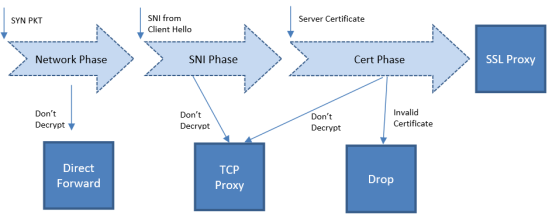
| 1 | Policy Validation Flow |
Network Phase
The Network Phase is evaluated on the TCP SYN packet.
| Inputs: source and destination IP addresses, source and destination ports, and VLAN identifiers. |
| Evaluation Order: no-decrypt rules are evaluated before decrypt rules. Decrypt rules are checked in the following sequence: source IP, destination IP, source port, destination port, and VLAN. |
| If a no-decrypt rule matches, packets are processed as non-proxy traffic using the bypass VLAN path (Direct Forward). This decision remains final for the lifetime of that TCP connection. |
| If traffic is to be decrypted, processing continues to later phases. A decrypt verdict from the Network Phase can be overridden by a more specific rule in a subsequent phase. |
For connections marked for decryption:
| If the Client Hello contains SNI, policy is further evaluated in the SNI and Certificate phases. |
| If no SNI is present, only the Certificate Phase is evaluated. |
| For HTTPS proxy connections, hostname information from the CONNECT request is also used during evaluation. |
SNI Phase
The SNI Phase evaluates the Server Name Indication (SNI) field from the Client Hello.
| Input: the hostname obtained from SNI. |
| Evaluation Order: no-decrypt (domain) → decrypt (domain) → no-decrypt (category) → decrypt (category). |
| Wildcard domains (for example, *.example.com) can be used to match all sub-domains, while plain domains (for example, example.com) match only the exact host. |
| If traffic is not decrypted, it is handled through the TCP Proxy path. For traffic that is decrypted, the plaintext version is sent through the configured tool path according to the decrypt tool-bypass settings. |
When URL category-based rules are configured and a URL cache miss occurs, behavior depends on the URL Cache Miss Action:
| decrypt or no-decrypt — applied immediately. |
| defer — causes a temporary delay. |
For compliance reasons, no-decrypt is the recommended cache-miss action.
Certificate Validation
When traffic is marked for decryption (from the SNI phase or when SNI is absent), the system validates the server certificate using the configured trust store. Checks include:
| certificate expiry, hostname mismatch, and self-signed status; |
| optional revocation status if enabled. |
If the certificate is valid, a new server certificate is issued using the primary MitM CA. If validation fails, the connection is dropped unless a security exception is configured. When a secondary MitM CA is defined, it may be used to issue replacement certificates in such cases. The primary MitM CA is optional for inbound deployments.
Certificate Phase
The Certificate Phase is evaluated for all connections after certificate validation.
| Inputs: certificate issuer and subject name. The Common Name (CN) attribute is extracted from the certificate subject and used for policy matching. |
| Evaluation Order: rules based on certificate subject (CN) first, then issuer-based rules using the CN and DN of the issuer. |
| If traffic is not decrypted, it is processed as TCP Proxy traffic—the server SSL session is reset and the Client Hello is resent. |
For HTTPS proxy connections, the Certificate Phase also evaluates policies using the hostname from the CONNECT request. If required, no-decrypt can be applied during this phase for such connections.
Together, these evaluation phases ensure that decryption behavior is accurate, rule-driven, and compliant, allowing administrators to define precise control over SSL/TLS traffic handling.
Policy Profile Options
This section describes a few of the options for the Inline TLS/SSL policy profile. Refer to the following sections:
| Inline TLS/SSL Decryption Port Map |
| Enable or Disable Tool Bypass |
| High Availability Active Standby |
| Inline Network Group Multiple Entry |
| Tool Early Engage |
| One-Arm Mode |
| Tool Early Inspect |
| Inline TLS/SSL L3 Tool NAT/PAT Support |
Inline TLS/SSL Decryption Port Map
The TCP destination port for decrypted traffic sent to inline tools can be configured in the decryption profile.
If not configured, the system automatically uses the same TCP destination port as the incoming traffic.
The appliance determines the TCP port for decrypted traffic based on two priority levels:
| Priority 1 — Port Map (User-Configured):You can define a mapping between the In Port and Out Port. |
| In Port refers to the TCP destination port received from the client. |
| Out Port is the TCP port used to send decrypted traffic to inline tools. |
| Priority 2 — Default Out Port: This port is used when the incoming port does not match any entry in the configured port map. |
Note: Decryption Port Mapping and Tool Early Inspect cannot be configured at the same time.
Enable or Disable Tool Bypass
Tool bypass determines whether specific traffic types are sent to inline tools. You can enable or disable tool bypass for the following types of traffic:
| TLS/SSL decrypted traffic |
| Non-decrypted SSL traffic (non-TLS/SSL TCP) |
| Non-TLS/SSL traffic (non-TCP) |
By default, tool bypass is disabled for all traffic types. This means that all decrypted TLS/SSL, non-decrypted TLS/SSL, and non-TLS/SSL traffic is sent to the tools for inspection.
When you enable tool bypass for a traffic type, that specific traffic is excluded from tool processing and not sent to the inline tools.
High Availability Active Standby
Inline network High Availability (HA) in Active/Standby mode supports detection of link switch overs triggered by upstream devices.
When an upstream device, such as a firewall, performs an HA failover, the system identifies the change and continues forwarding traffic through the correct inline network.
For example, in an inline TLS/SSL network group with two network port pairs (Na1/Nb1 and Na2/Nb2), incoming traffic may shift from Na1 to Na2 during an upstream failover.
The system automatically detects this transition and maintains traffic continuity by routing packets through the appropriate inline link.
By default, this feature is disabled.
Note: Do not enable this option if the inline TLS/SSL network group operates in an Active/Active configuration.
Inline Network Group Multiple Entry
An inline network group topology can include multiple network port pairs (for example, Na1/Nb1 and Na2/Nb2).
With multiple port pairs, traffic from a network interface may traverse the system more than once.
Intercepted traffic from one interface can reenter the system through another interface within the same network group, as shown below.
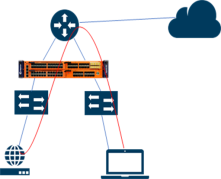
| 2 | Inline TLS/SSL Inline Network Group Configuration |
Inline TLS/SSL – Multiple Entry Behavior
When the inline TLS/SSL appliance is positioned between internal devices and the upstream router, traffic from internal devices to the Internet is intercepted by the appliance.
If internal devices associated with different network port pairs in the same group communicate with each other, their traffic first travels from the source device to the appliance, then to the upstream router, and finally reenters the appliance through another port pair to reach the destination device.
The appliance maintains the inline incoming interface (for example, Na1) for each connection.
If subsequent traffic from the same connection reenters through a different interface within the same group (for example, Na2), the appliance forwards the packets directly to the corresponding opposite interface (Nb2) without additional processing.
This enables seamless reentry handling for ongoing connections. Traffic that reenters through the same network port pair (for example, Nb2 → Na2) is not supported.
Similarly, any connection that uses more than the original network pair (for example, first packet on Na1/Nb1 and later through another pair) is unsupported.
All traffic for a connection must continue through the same port pair used by the first packet.
You can enable or disable Inline Network Group Multiple Entry in the profile settings. By default, this feature is disabled.
Tool Early Engage
In a Layer 3 topology, inline tools may need to modify the MAC address or VLAN IDs when forwarding client traffic back to the server.
The Tool Early Engage option allows inline tools to perform these modifications effectively.
When a client initiates a connection, the appliance first establishes the connection with the inline tool before connecting to the server.
This early engagement enables the inline tool to adjust MAC addresses or VLAN IDs as needed when sending traffic back to the server.
| Tool Early Engage can be enabled for a policy profile as a standalone feature, even when One-Arm mode is not used. |
| Tool Early Engage and Tool Early Inspect cannot be configured together. |
One-Arm Mode
In a Layer 3 topology, One-Arm mode allows both client and server traffic to traverse the same physical or logical link (for example, an aggregate port channel). You can configure this only after enabling Tool Early Engage.
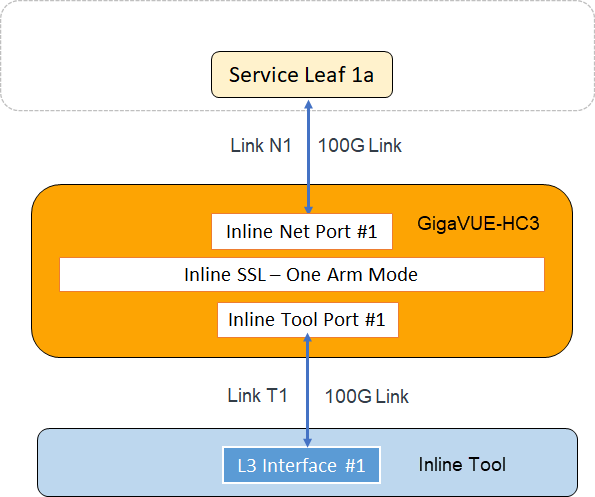
For each connection between the client and server, there are two TCP sessions established between GigaSMART and the inline network and two TCP sessions established between GigaSMART and the inline tool. In the above diagram, you can see that with the One-Arm mode enabled, both TCP sessions from the inline network side arrive at GigaSMART on the same link N1. The TCP sessions from the inline tool side arrive at GigaSMART on the same link T1.
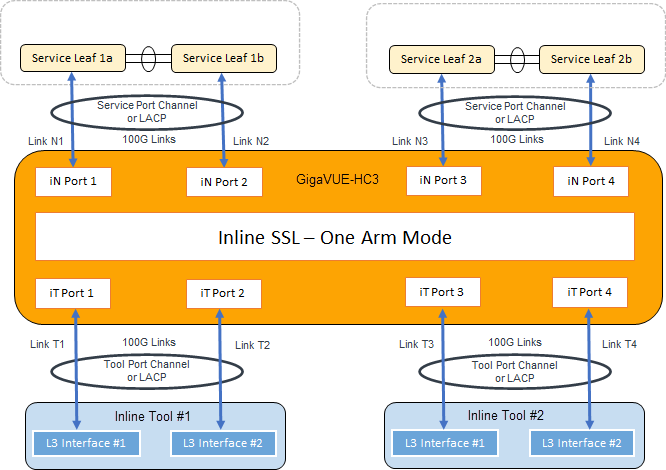
In the above figure, the inline network link and inline tool link works as a pair – (N1, T1), (N2, T2), (N3, T3), and (N4, T4). The GigaSMART sends traffic to the corresponding tool link of the received network link. Similarly, GigaSMART sends the traffic back to the server on the corresponding network link of the received inline tool link. For example, when a connection comes to GigaSMART from the inline network N1, after decryption, GigaSMART sends clear text traffic to inline tool on T1. The return traffic of the same connection arrives at GigaSMART on the inline tool link T2. GigaSMART then re-encrypts the traffic and sends it to the server on the inline network link N2.
Failover Support
If either member of a link pair fails, the paired link is also taken down to preserve flow consistency.
This behavior can be achieved by configuring Link Aggregation Control Protocol (LACP) or enabling Link Failure Propagation (LFP) between each network-tool link pair.
One-Arm Mode — Rules and Notes
Before enabling One-Arm mode for a policy profile, observe the following:
| Connect inline network interfaces to the Na side and inline tool interfaces to the Nb side. |
| Tool Early Engage must be enabled. |
| One-Arm mode is not supported on the Flexible Inline Decryption solution. |
| To route packets through a firewall, configure the client and server gateways to use the router’s IP address. |
| Second-level OOB is not supported; use map-passall from the tool port instead. |
| When both Tool Early Engage and One-Arm mode are enabled, MAC addresses and VLAN IDs can be changed, but IP addresses, ports, and protocols cannot. |
| Inline Network Group Multiple Entry and High Availability Active/Standby features are not supported. |
| Enable LACP on both network and tool sides, and LFP on the inline-network configuration. |
| Bypass-tool options in the Inline TLS/SSL profile (Decrypt, No-Decrypt, Non-TLS/SSL) require another router on the network side to route packets. |
| The name “one-arm” is a reserved keyword. Do not use it as an alias for any inline network, tool, or map. Rename existing aliases before upgrading to GigaVUE-OS 5.12.xx. |
| Resilient Inline Arrangement (RIA) is not supported with One-Arm mode. |
| If “one-arm” is configured as a tool in an inline second-level map, the VPort status displays as Up (not Up (Normal) ). |
| One-Arm mode cannot coexist with the Tool Early Inspect feature. |
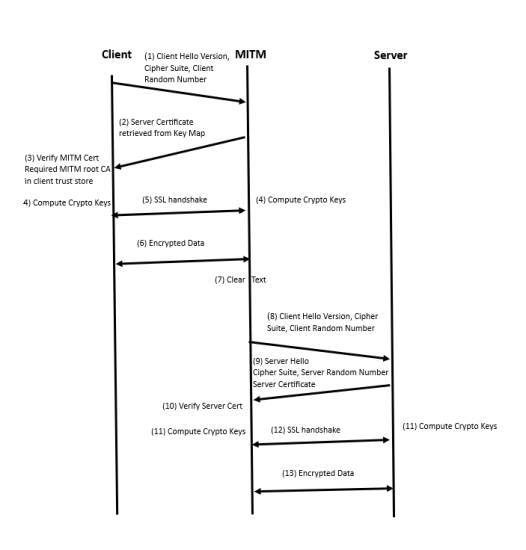
Tool Early Inspect
In a standard Inline TLS/SSL deployment, the node intercepts the TLS/SSL session between the client and server and forwards decrypted data to the inline tool after completing the handshake with both ends.
This means that connections rejected by the tool are still fully established to the server.With Tool Early Inspect , the client’s handshake completes first using the configured server certificate and key.
Decrypted data is then sent to the inline tool for inspection before connecting to the real server, ensuring only valid sessions proceed.
Note: Tool Early Inspect is supported only in inbound deployment modules. Outbound and hybrid modules are not supported.
The below diagram shows how a client handshake sequence would be once the Tool Early Inspect is enabled.
Inline TLS/SSL L3 Tool NAT/PAT Support
This feature offloads TLS decryption from Layer-3 inline tools that perform NAT/PAT (Network/Port Address Translation).
The GigaSMART engine maintains two independent sessions—one toward the client and one toward the server—to achieve this separation.
Supported Platforms
| Gen3 cards in GigaVUE-HC1 and GigaVUE-HC3 |
| GigaVUE-HC1-Plus |
HTTP 2.0 Downgrade
When NAT/PAT mode is enabled, the HTTP 2.0 Downgrade option is enabled by default. HTTP 2.0 traffic is downgraded to HTTP 1.1 for decryption. If the downgrade option is disabled, HTTP 2.0 traffic is forwarded without decryption.
Decryption Port Mapping
In the Inline SSL application profile , you can now sent decrypted traffic to user-defined L4 ports. This feature supports the following scenarios:
| One-to-One Tool Port Address Translation: A specific clear text port for Inline SSL traffic is assigned, and after decryption, the flow is directed to this assigned port |
| Many-to-One Tool Port Address Translation: Multiple incoming SSL Layer 4 ports are mapped to a specific single clear text Layer 4 port. If no specific mapping exists, decrypted traffic will be directed to the designated clear text port |
| No Port Mapping- If one-to-one or default port mappings are not configured, decrypted traffic will continue to use the same original L4 port from the incoming encrypted data. |
To configure this feature, enable the NAT/PAT Mode and then configure the port details in TCP Port MAP Decryption.
The port details can be configured through the apps inline-ssl command. Refer to GigaVUE-OS CLI Reference Guide.
Limitations
| L3 Tool port address translation does not apply to web proxy scenarios. Therefore, support for tool port address translation will not be included for web proxy traffic. |
| The Start TLS port should not be configured in any port mapping settings, whether one-to-one or as a default port map. |
| Any L4 port expected to receive the first data from the server must not be included in the port mapping configuration. |
Cache Server Certificate Timeout
The server information is cached for performance optimization. The default time out is 30 minutes. The cache is flushed when the cache timeout value is set to zero. The cache is disabled when the timeout value is set to zero.
Refer to the following Gigamon Validated Design for more information:
- Offloading TLS Decryption for an One-Armed Inline Tool in L3 with NAT/PAT Mode
- Enabling GigaSECURE TLS Decryption to Offload SSL Inspection from Next-Generation Firewall
Limitations
| Decrypted data visible to inline tools is limited to HTTP/1.1 over TLS. |
| StartTLS traffic is not decrypted. |
| Tool bypass is not supported because all packets must pass through the inline tool. |
| Cannot coexist with Network Group Multiple Entry, Inline Network HA, RIA, Tool Early Engage, Tool Early Inspect, or One-Arm mode. |
| IPv6 is unsupported in release 6.1.00 but supported from 6.2.00 onward. |
Cache Persistence
There are four in-memory caches as follows. They are not configurable.
| Re-signed certificate cache |
| URL category cache |
| Revocation certificate cache |
| Session resumption cache |
Caches are maintained for Internet lookups such as URL categorization and certificate revocation checks using OCSP or CRL for faster subsequent lookups. The cache persistence feature allows the information to be saved on the GigaVUE node in the control card’s persistent storage so that it can be retrieved in case of reboots. This allows the GigaSMART card to start with the information learned earlier. This feature is enabled by default and can be disabled if needed.
On the Cache Persistence page, you can:
-
Search for specific entries in the caches using the Find Entries option
-
Clear the caches using the Clear Store option from the Actions drop-down menu
-
Display a summary of the records.
GigaSMART Overload Bypass
Packet buffers, CPU, memory utilization and concurrent connections are monitored for overloaded conditions. GigaSMART goes to bypass when resource usage exceeds thresholds. Existing connections will continue to be processed by GigaSMART, but any new connections will be bypassed.
|
Criteria |
GigaVUE‑HC1 |
GigaVUE‑HC3 (per GigaSMART Engine) |
|---|---|---|
|
Maximum connections per second |
1500 |
5000 |
|
Maximum connections |
100000 |
200000 |
|
Resource Packet Buffer |
Overload threshold for packet buffer resources for GigaSMART operations. |
|
|
Resource CPU |
Rising threshold for GigaSMART CPU statistics. |
|
|
Heap exhaust |
80% |
|
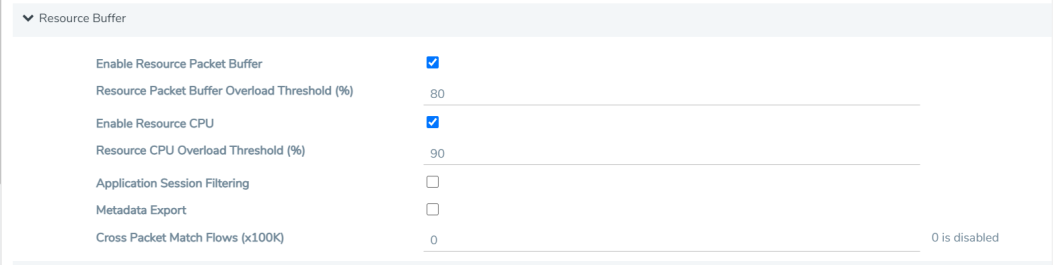
To configure the Packet Buffer and CPU threshold values, navigate to GigaSMART > GigaSMART Operations (GSOP) > Resource Buffer and configure the following:
- Resource Packet Buffer Overload Threshold (%)
- Resource CPU Overload Threshold (%)
CPU Overload Threshold
Due to sudden bursts of traffic, the GigaSMART CPU can become too busy and drop packets. However, when a system or application reaches a threshold, SSL sessions can be bypassed. When a maximum CPU is reached, incoming connections will be bypassed.
When the CPU overload threshold is set to a configured value, (for example, 90%), the lower threshold is set to two-third of the CPU overload threshold configured (in this example 60%). A mean threshold is calculated, which will be the average of the CPU overload threshold and the lower threshold (in this example 75%).
The following actions will be taken:
| If the CPU hits the overload threshold, all new SSL connections will be bypassed. |
| If the CPU reduces to the mean threshold, half of the new SSL connections will be bypassed. |
| If the CPU reduces further to the lower threshold, all new SSL connections will be decrypted. |
If you choose connectivity-over-security, the CPU overload threshold must be set to the lower threshold value.
Inline TLS/SSL Monitor Mode
Use the inline TLS/SSL monitor mode to assist in understanding your network topology. Monitor mode provides information about the traffic going to the GigaSMART card, which can help to learn about your deployment. When monitor mode is enabled, the monitor application collects information such as TCP ports used and VLAN information about the incoming traffic.
After inline TLS/SSL decryption is configured and monitor mode is enabled, the inline TLS/SSL application does not terminate the session. Instead, the monitor application collects information and forwards packets to the tool port or network port based on the configuration of the non-TLS/SSL TCP bypass action. For any Monitor mode, you can enable or disable seamlessly without any other configuration changes.
Monitor mode is disabled by default. To enable the monitor mode, refer to Configure the Inline TLS/SSL Monitor Mode.
For packets coming from the network port, the monitor application collects packet flow information.
From the information collected from monitor mode, you can analyze the following cases:
| duplicate TCP SYN—For a given session, the SYN messages with a different packet signature than 5tuple, for example, a different VLAN ID, indicates the packet is coming from multiple paths. |
| asymmetric routing—For a given session, packets arriving from multiple network interfaces indicates a packet is coming from multiple paths. |
Inline SSL Monitor mode only captures TCP information, not SSL information. However Inline SSL Persistent Monitor mode captures both TCP and SSL information.
Note: Monitor mode is supported for standalone nodes only, not for nodes in a cluster.
Inline TLS/SSL Traffic Filtering
Because TLS/SSL/ connections can carry sensitive data, some organizations may require the TLS/SSL connections to avoid inspection. The SSL connections that carries user data such as financial or health care information can be bypassed without inspection, based on a configured policy.
Based on the decryption policies, some connections are not decrypted and are passed through, optionally through tools, without decryption. The inline SSL decryption solution respects data privacy and supports compliance.
Inline SSL decryption provides different ways to filter traffic, as follows:
| No-decrypt lists specify traffic to always pass through. A no-decrypt list policy states that traffic from certain sites should always skip decryption. |
| Decrypt lists specify traffic to always decrypt. A decrypt policy states that traffic from certain sites should always be decrypted. |
| Both No-decrypt lists and Decrypt lists IP addresses, IP subnets and explicit wildcards as domain rules. |
| URL Web Services categorizes the URLs by their type, such as MyBank.com is a financial institution, so as a policy, do not decrypt that traffic. This is also called URL filtering. Typically, banking and health care information are not decrypted. |
| Policy rules based on network attributes, such as |
| Source IPv4 address |
| Destination IPv4 address |
| VLAN |
| L4 port |
No-decrypt Listing Policy
No-decrypt lists are typically used in environments where the default is to decrypt, excepting for certain sites or classes of sites which cannot be decrypted for legal or compliance reasons. By default, traffic that is not to be decrypted is forwarded to the tools unless otherwise configured.
A no-decrypt list file can contain a maximum of 10,000 entries.
Decrypt Listing Policy
Decrypt listing is typically used at sites where specific classes of connections must be decrypted, although the default for other traffic is not to decrypt. Decrypt listed domains and host names will always be decrypted.
A decrypt list file can contain a maximum of 10,000 entries.
No-Decrypt/Decrypt List Policy — Rules and Notes
While configuring a No-Decrypt / Decrypt policy keep in mind the following rules and notes:
-
The maximum domain/hostnames support per list is 10000.
-
IP Subnets are supported from 5.13.01 version. Example, 10.10.10.0/24.
-
Special characters are not supported unless they are used to define domain names, such as * . - @ are supported for domain names and / is supported if IP subnet is defined. # is supported to comment out a line. Example of a text file format would be as follows:
-
*.google.com
-
www.gigamon.com
-
gigamon.com
-
domain-registration.com.us
-
10.10.1.1
-
10.10.1.0/24
-
-
Range of IP addresses are not supported example, 10.10.10.10-20.
-
Use a newline for each entry. Adding characters such as , ; are not supported.
-
The domain gigamon.com as an entry matches only gigamon.com. To match all subdomains of gigamon.com on v5.9+, use *.gigamon.com.
-
If the system has large set of decrypt/no-decrypt list entries, GigaVUE-FM stats page and CLI stats command does not display any output. Wait for 5 to 10 minutes after reloading to check the inline SSL show stats command in CLI and stats page in GigaVUE-FM.
IP Address Subnet with Longest Prefix Match(LPM)
The No-decrypt and Decrypt database allows the user to utilize IP subnets. This allows the user to configure overlapping IP addresses, in decrypt and no-decrypt database. The decision to decrypt or no-decrypt will be based on the longest prefix match of the IP entries available in the decrypt /no-decrypt database.
The format is as follows subnet (no space) /prefix.Eg: 191.1.1.0/32
URL Categorization
URL categories make it convenient to apply policies on all the possible URLs matching the category and reduce the number of policy rules. Categorization is based on the hostname in the TLS Server Name Indication (SNI) or the subject name from the server certificate if there is no SNI. There are 83 categories including one for Uncategorized, which is a default category for URLs that do not match any of the other 108 categories. The categories are fixed meaning that categories cannot be added, deleted or modified.
GigaSMART ships with a local database of 1M entries and will also perform a cloud lookup for those hosts not found in the local database. The URL Web Service provides the URL categorization. The URL database is updated daily from the URL Web Service. Each update likely adds new entries and purges other entries, but always keeping the database at 1M entries.
Note: When a URL is not in the cache, for cloud look-ups the stack port interface on GigaSMART must be configured to provide Internet access.
URL Category Look-ups and Caching
As part of the Inline SSL processing, URL category look-ups are performed against the database. If the URL is not found in the database, then a lookup is performed against the local cache. If the URL is not found in the local cache, then an external lookup to the URL Web Services may be performed, if configured. If the URL is found in the external look-up, then it is dynamically saved in the local cache. Future look-ups may then find the URL in the local cache instead of requiring the external look-up.
Note:
| For TLS connections containing SNI in the Client Hello, do not perform URL category look-up in the certificate phase. |
| CN based evaluation can be performed using the configuration option. |
The local cache can hold up to 250k entries (in addition to the 1M entry database). The local cache works like a circular buffer – older entries are discarded to make room for newer ones if the cache is full. Each cache entry is valid for 24 hours and updated with current time stamp whenever an entry is made. If an expired entry is encountered, a new query is issued to the URL Web Services to refresh the entry in the cache. Expired entries don’t get actively deleted from the cache.
While the URL Web Service is hosted on AWS, external look-ups need to occur very quickly. Gigamon provides a timeout option, up to 10 seconds for external URL category look-ups via the URL cache miss defer option.
- URLs may get re-categorized as part of updates from the URL Web Services. This is transparent to Gigamon and customers.
The URL category classification is fixed, and a new category cannot be added. Gigamon provides the no-decrypt list/decrypt list functionality, which can achieve the same result as creating a custom category.
If a URL belongs to multiple categories, any no-decrypt policy would take precedence over all decrypt policies.
Inline SSL URL categories
The following are the list of Inline SSL URL categories with examples.
Note: Gigamon does not endorse any of the following categories, descriptions, and examples, but replicated the information from the URL Web Services. Some categories are presented without examples since they are not appropriate.
|
Category Name |
Description and Examples |
|
Abortion |
Abortion topics, either pro-abortion and anti-abortion. |
|
Abused Drugs |
Discussion or remedies for illegal, illicit, or abused drugs such as heroin, cocaine, or other street drugs. This category includes information on the misuse of non-proscribed substances (eg. "glue sniffing"), or the misuse of prescription medications. |
|
Adult and Pornography |
Sexually explicit material for the purpose of arousing a sexual or prurient interest. Online groups, including newsgroups and forums, that are sexually explicit in nature. |
|
Alcohol and Tobacco |
Sites that provide information on, promote, or support the sale of alcoholic beverages or tobacco products and associated paraphernalia. |
|
Auctions |
Sites that support the offering and purchasing of goods between individuals as their main purpose. Does not include classified advertisements. http://ebay.co http://quibids.com |
|
Botnets |
These are URLs, typically IP addresses, which are determined to be part of a Bot network, from which network attacks are launched. Attacks may include SPAM messages, DOS, SQL injections, proxy jacking, and other unsolicited contacts. |
|
Business and Economy |
Business firms, corporate websites, business information, economics, marketing, management, and entrepreneurship. http://samsung.com http://ups.com |
|
Content Delivery Networks |
Delivery of content and data for third parties, including ads, media, files, images, and video. http://metacdn.co http://edgestream.com |
|
Cheating |
Sites that support cheating on examinations and contain such materials, including free essays, exam copies, plagiarism, etc. |
|
Computer and Internet Info |
General computer and Internet sites, technical information. SaaS sites and other URLs that deliver internet services. http://ranking.co http://system.netsuite.com |
|
Computer and Internet Security |
Computer/Internet security, security discussion groups. http://siteadvisor.co http://webroot.com |
|
Confirmed Spam Sources |
Confirmed SPAM sources. |
|
Cult and Occult |
Internet resources which include discussion of astrology, spells, curses, magical powers, satanic rituals or supernatural beings. This includes horoscope sites. |
|
Dating |
Dating websites focused on establishing personal relationships. http://eharmony.com |
|
Dead Sites |
These are dead sites that do not respond to http queries. Policy engines should usually treat these as “Uncategorized” sites. http://g00gle.com http://whitehouse.info |
|
Dynamic Content |
Domains that generate content dynamically based on arguments to their URL or other information (like geo-location) on the incoming web request. booking.com |
|
Education Institution |
Pre-school, elementary, secondary, high school, college, university, and vocational school and other educational content and information including enrollment, tuition, and syllabus. http://mit.edu http://ox.ac.uk |
|
Entertainment and Arts |
Motion pictures, videos, television, music and programming guides, books, comics, movie theatres, galleries, artists or reviews on entertainment. http://eonline.com http://warnerbros.com |
|
Fashion and Beauty |
Fashion or glamour magazines, beauty, clothes, cosmetics, style. http://visionmodels.co.uk http://genejuarez.com |
|
Financial Services |
Banking services and other types of financial information, such as loans, accountancy, actuaries, banks, mortgages, and general insurance companies. Does not include sites that offer market information, brokerage or trading services. http://firstpremierbankcards.com http://paypal.com |
|
Gambling |
Gambling or lottery web sites that invite the use of real or virtual money. Information or advice for placing wagers, participating in lotteries, gambling, or running numbers. Virtual casinos and offshore gambling ventures. Sports picks and betting pools. |
|
Games |
Playing or downloading, video games, computer games, electronic games, tips, and advice on games or how to obtain cheat codes. Also includes sites dedicated to selling board games as well as journals and magazines dedicated to game playing. http://duowan.com http://ubi.com |
|
Government |
Information on government, government agencies and government services such as taxation, public, and emergency services. Also includes sites that discuss or explain laws of various governmental entities. Includes local, county, state, and national government sites. http://www.nasa.gov http://premier-ministre.gouv.fr |
|
Gross |
Sites that contain material which describe or display material which would be considered foul or disgusting. Examples would include bodily fluids, injuries, gore. |
|
Hacking |
Illegal or questionable access to or the use of communications equipment/software. Development and distribution of programs that may allow compromise of networks and systems. |
|
Hate and Racism |
Sites that contain content and language in support of hate crimes and racism. |
|
Health and Medicine |
General health, fitness, well-being, including traditional and non-traditional methods and topics. Medical information on ailments, various conditions, dentistry, psychiatry, optometry, and other specialties. http://webmd.com http://missionvalleymedical.com |
|
Home and Garden |
Home issues and products, including maintenance, home safety, decor, cooking, gardening, home electronics, design, etc. http://homedepot.com http://waysidegardens.com |
|
Hunting and Fishing |
Sport hunting, gun clubs, and fishing. http://fishingworks.com http://wildlifelicense.com |
|
Illegal |
Criminal activity, copyright and intellectual property violations, etc. |
|
Image and Video Search |
Photo and image searches, online photo albums/digital photo exchange, image hosting. http://images.google.fr http://gettyimages.com |
|
Individual Stock Advice and Tools |
Promotion and facilitation of securities trading and management of investment assets. Also includes information on financial investment strategies, quotes, and news. http://stockstar.com http://morningstar.com |
|
Internet Communications |
Internet telephony, messaging, VoIP services and related businesses. http://skype.com http://www.chatib.com/ |
|
Internet Portals |
Web sites that aggregate a broader set of Internet content and topics, and which typically serve as the starting point for an end user. http://yahoo.com http://qq.com |
|
Job Search |
Assistance in finding employment, and tools for locating prospective employers, or employers looking for employees. http://monster.com http://51job.com |
|
Keyloggers and Monitoring |
Downloads and discussion of software agents that track a user's keystrokes or monitor their web surfing habits. |
|
Kids |
Sites designed specifically for children and teenagers. http://www.mundogaturro.com http://www.poptropica.com |
|
Legal |
Legal websites, law firms, discussions and analysis of legal issues. http://www.pepperlaw.com http://earlcaterlaw.com |
|
Local Information |
City guides and tourist information, including restaurants, area/regional information, and local points of interest. http://downtownlittlerock.com http://sandiegorestaurants.com |
|
Malware Sites |
Malicious content including executables, drive-by infection sites, malicious scripts, viruses, trojans, and code. |
|
Marijuana |
Marijuana use, cultivation, history, culture, legal issues. |
|
Military |
Information on military branches, armed services, and military history. http://defense.gov http://www.mod.uk |
|
Motor Vehicles |
Car reviews, vehicle purchasing or sales tips, parts catalogs. Auto trading, photos, discussion of vehicles including motorcycles, boats, cars, trucks and RVs. Journals and magazines on vehicle modifications. http://www.carmax.com http://carsales.com.au |
|
Music |
Music sales, distribution, streaming, information on musical groups and performances, lyrics, and the music business. http://itunes.com http://bandcamp.com |
|
News and Media |
Current events or contemporary issues. Also includes radio stations, magazines, online newspapers, headline news sites, newswire services, personalized news services, and weather sites. http://abcnews.go.com http://newsoftheworld.co.uk |
|
Nudity |
Nude or seminude depictions of the human body. These depictions are not necessarily sexual in intent or effect but may include sites containing nude paintings or photo galleries of artistic nature. |
|
Online Greeting Cards |
Online Greeting card sites. http://123greetings.com http://greeting-cards.com |
|
Online Personal Storage |
Online storage and posting of files, music, pictures, and other data. http://box.net http://freefilehosting.net |
|
Open HTTP Proxies |
The proxy servers that are accessible by any Internet user. |
|
P2P (Peer to Peer) |
Peer to peer clients and access that includes torrents, music download and programs. |
|
Parked Sites |
Parked domains are URLs which host limited content or click-through ads which may generate revenue for the hosting entities but generally do not contain content useful to the end user. Also includes Under Construction, folders, and web server default home pages. http://000.com http://buythisdomain.com |
|
Pay to Surf |
Sites that pay users in the form of cash or prizes, for clicking on or reading specific links, email, or web pages. |
|
Personal Sites and Blogs |
Personal websites posted by individuals or groups, as well as blogs. http://blogger.com http://wordpress.org |
|
Philosophy and Political Advocacy |
Politics, philosophy, discussions, promotion of a particular viewpoint or stance in order to further a cause. http://philosophynow.org http://political.com |
|
Phising and Other Frauds |
Phishing, pharming, and other sites that pose as a reputable site, usually to harvest personal information from a user. These sites are typically quite short-lived, so examples may not last long. |
|
Private IP Addresses |
RFC 1918, Address Allocation for Private Intranets. 10.0.0.0 - 10.255.255.255 (10/8 prefix) 192.168.0.0 - 192.168.255.255 (192.168/16 prefix) |
|
Proxy Avoid and Anonymizers |
Proxy servers and other methods to gain access to URLs in any way that bypasses URL filtering or monitoring. Web-based translation sites that circumvent filtering. |
|
Questionable |
Tasteless humor, “get rich quick” sites, and sites that manipulate the user experience or client in some unusual, unexpected, or suspicious manner. |
|
Real Estate |
Information on renting, buying, or selling real estate or properties. Tips on buying or selling a home. Real estate agents, rental or relocation services, and property improvement. http://prudentialproperties.com http://realtor.com |
|
Recreation and Hobbies |
Information, associations, forums and publications on recreational pastimes such as collecting, kit airplanes, outdoor activities such as hiking, camping, rock climbing, specific arts, craft, or techniques; animal and pet related information, including breed-specifics, training, shows and humane societies. http://petloverspublications.com http://craftster.org |
|
Reference and Research |
Personal, professional, or educational reference material, including online dictionaries, maps, census, almanacs, library catalogues, genealogy, and scientific information. http://reference.com http://wikipedia.org |
|
Religion |
Conventional or unconventional religious or quasi-religious subjects as well as churches, mosques, synagogues, or other places of worship. http://therocksandiego.org http://biblesociety.ca |
|
Search Engines |
Search interfaces using key words or phrases. Returned results may include text, websites, images, videos, and files. http://google.com http://sogou.com |
|
Sex Education |
Information on reproduction, sexual development, safe sex practices, sexually transmitted diseases, sexuality, birth control, sexual development, and contraceptives. http://sexetc.org |
|
Shareware and Freeware |
Sites that contains softwares, screensavers, icons, wallpapers, utilities, ringtones including downloads that request a donation on open source projects. http://download.com http://sourceforge.net |
|
Shopping |
Department stores, retail stores, company catalogs and other sites that allow online consumer or business shopping to purchase goods and services. http://amazon.com http://groupon.com |
|
Social Network |
Social networking sites that have user communities where users interact, post messages, pictures, and otherwise communicate. http://facebook.com http://twitter.com |
|
Society |
A variety of topics, groups, and associations relevant to the general populace, broad issues that impact a variety of people, including safety, children, societies, and philanthropic groups. http://dar.org http://unicefusa.org |
|
Spam URLs |
URLs contained in SPAM. |
|
Sports |
Team or conference web sites, international, national, college, professional scores and schedules; sports-related online magazines or newsletters, fantasy sports and virtual sports leagues. http://nba.com http://schoenen-dunk.de |
|
Spyware and Adware |
Spyware or Adware sites that provide or promote information gathering or tracking that is unknown to, or without the explicit consent of, the end user or the organization, also unsolicited advertising popups and programs that may be installed on a user's computer. |
|
Stream Media |
Sales, delivery, or streaming of audio or video content, including sites that provide downloads for such viewers. http://youtube.com http://ustream.tv |
|
Swimsuits and Intimate Apparel |
Swimsuits, intimate apparel or other types of suggestive clothing. |
|
Training and Tool |
Distance education, trade schools, online courses, vocational training, software training, and skills training. http://trainingtools.com http://prezi.com |
|
Translation |
Language translation sites that allow users to see URL pages in other languages. http://translate.google.com http://microsofttranslator.com |
|
Travel |
Airlines and flight booking agencies. Travel planning, reservations, vehicle rentals, car rentals, descriptions of travel destinations, promotions for hotels or casinos. http://cheapflights.com http://expedia.com |
|
Uncategorized |
Sites that have not been categorized by URL Web Service. |
|
Unconfirmed Spam Sources |
Unconfirmed SPAM sources. |
|
Violence |
Sites that advocate violence, depictions and methods, including game/comic violence, and suicide. |
|
Weapons |
Sales, reviews, descriptions of weapons such as guns, knives, martial arts accessories. |
|
Web Advertisements |
Advertisements, media, content, and banners. http://casalemedia.com http://justwebads.com |
|
Web Based Email |
Sites offering web-based email and email clients. http://google.com/mail http://foxmail.com |
|
Web Hosting |
Free or paid hosting services for web pages and information concerning their development, publication, and promotion. http://siteground.com http://bluehost.com |
Proxy Server Profile for URL Categorization and Certificate Revocation status
To ensure a stable security network you can now redirect URL look-ups and Certificate Revocation status checks to a Proxy Server Profile. This Proxy Server profile will be attached to your Inline SSL deployment . To learn more refer to Proxy Server Configuration section in GigaVUE Administration Guide


