Aggregation Tags
Aggregation tags are used to aggregate the resources for the purpose of collecting and analyzing statistics. For example, using aggregation tags, you can easily view and compare the aggregated traffic flowing through a list of ports. To analyze the aggregated traffic flowing through the ports highlighted in red in the following figure, you can create a tag ID with the name Group-A and assign the tag values as shown in the table.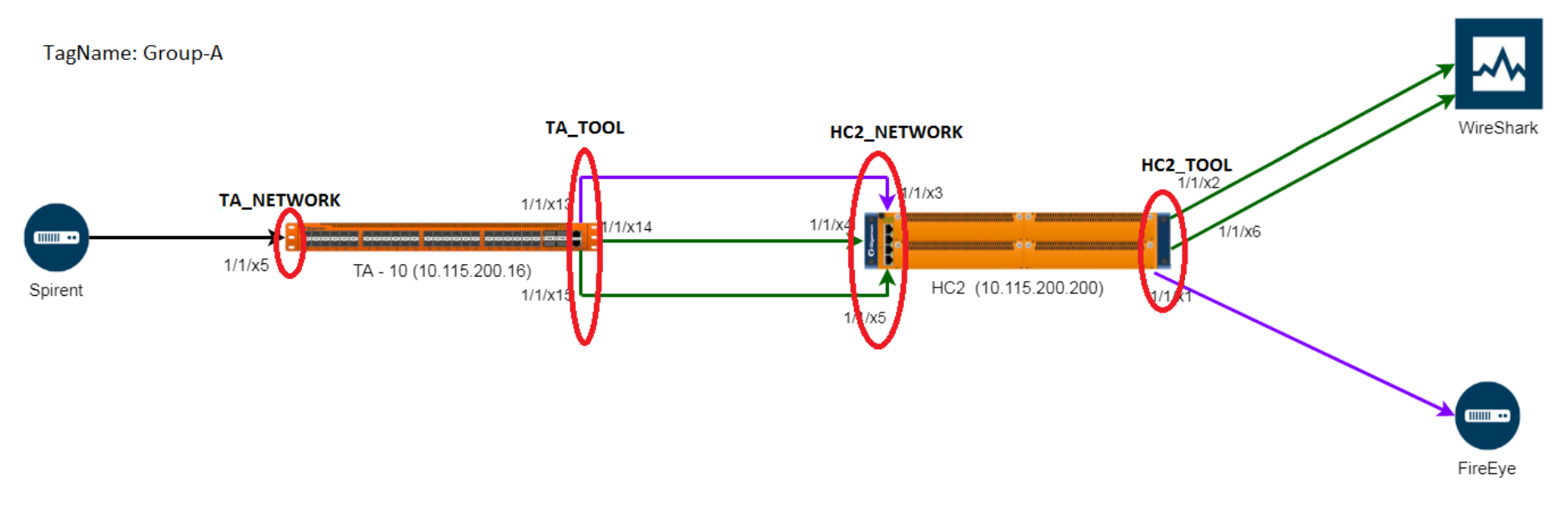
|
Ports |
Tag Value |
| 1/1/x5 | TA_Network |
| 1/1/x13, 1/1/x14, 1/1/ x15 | TA_TOOL |
| 1/1/x3, 1/1/x4, 1/1/x5 | HC2_NETWORK |
| 1/1/X2, 1/1/x6, 1/1/x1 | HC2_TOOL |
In the physical dashboard, you can create the following widgets to quickly compare the aggregated traffic flowing through the ports associated with TA_NETWORK with the traffic flowing through the ports associated with HC2_NETWORK:
- Highest Traffic
- Lowest Traffic
- Most Utilized Traffic
- Least Utilized Traffic
Consider another example. The tag ID 'Service' has the following tag values: IMS, GW, 5G. Perform the following tagging operations.
- Tag a set of network ports with service = IMS
- Tag a set of network ports with service = GW, 5G
- Tag a set of tool ports with service = IMS
- Tag a set of tool ports with service = GW, 5G
You can use the aggregation tags and derive the following statistics:
- Get the rate of traffic for all network IMS ports in the system (i.e. the total rate for the last one hour of all ingress IMS traffic)
- Get the rate of traffic for all tool ports with service = GW or 5G or if you have tagged a set of maps with service = 5G
- Get the total rate of all maps with service = 5G for the past one hour
 MORE INFORMATION


